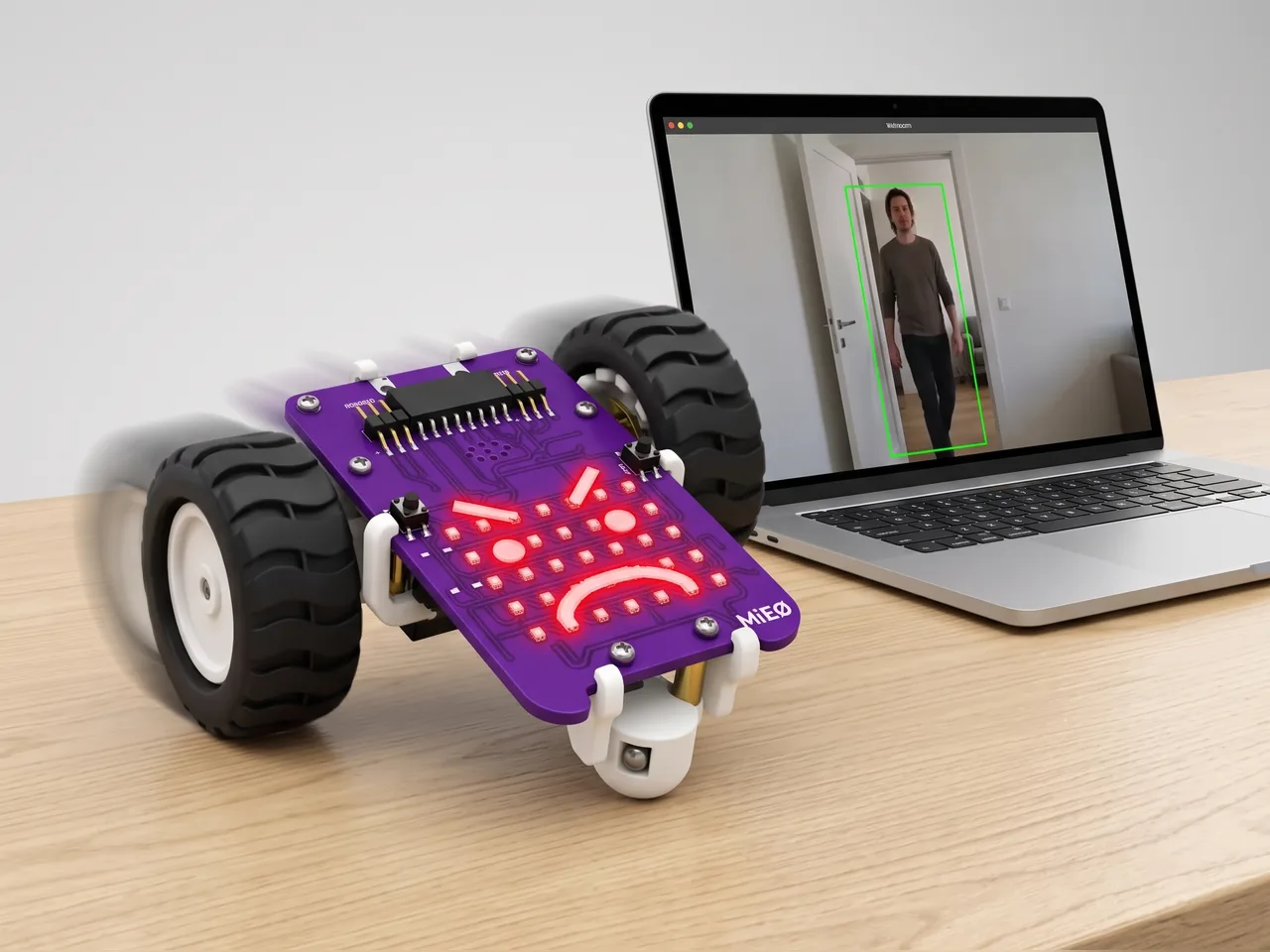
Robot Guard Dog
MIEO sleeps until a person walks into view, then sounds the alarm
What you'll build
Every desk needs a guard dog. In this project MIEO dozes with a sleepy face while the computer's webcam watches the room. Object Sense looks at each picture and can tell when a person is in it. As soon as someone walks in, MIEO wakes up angry, sounds its alarm and lunges forward and back like a dog that means business. When the coast is clear, it goes back to sleep. Object Sense works on your computer with no internet, so the pictures never leave the room.
What you'll learn
- How Object Sense finds people and things in a camera picture
- Asking “is there a person in view ?” to make a decision
- Using “if … else” so MIEO reacts one way or the other
- Adding a pause so a robot doesn't react too often
You'll need
- Mieo board
- Two N20 motors and their wheels
- Battery
- 3D-printed mountings
- Caster wheel
- Screws and screwdriver
- A webcam; most laptops have one built in
- A USB cable, or Bluetooth on your computer
- The Robolab app (free)
- A webcam (most laptops have one built in)
Stay safe
- Ask an adult to help with the small screws.
- Lift MIEO's wheels off the table before you upload a driving program, so it can't drive off the edge.
- The camera and microphone stay on your computer. Nothing MIEO sees or hears is sent anywhere.
Build it
- Build MIEO with both N20 motors, their wheels, the caster wheel and the battery, as in Switch Motor Start.
- Put MIEO on the floor or a big table in front of your computer, with room to move a little forward and back, away from any edge.
- Point the webcam at the door, or at the space in front of your desk.
- Switch MIEO on and connect it to your computer with a USB cable or over Bluetooth.
Code it

Want MIEO Bot to guide you?
Robolab's built-in tutor has a lesson on the same idea, “Robot Guard Dog”. Open MIEO Bot in Robolab, pick Maker, then Mieo, and it shows you the blocks one at a time and checks your work as you go.
About MIEO Bot's lessons- Open Robolab, choose Mieo, connect and set the switch at the top right to Arena. Add the Object Sense extension.
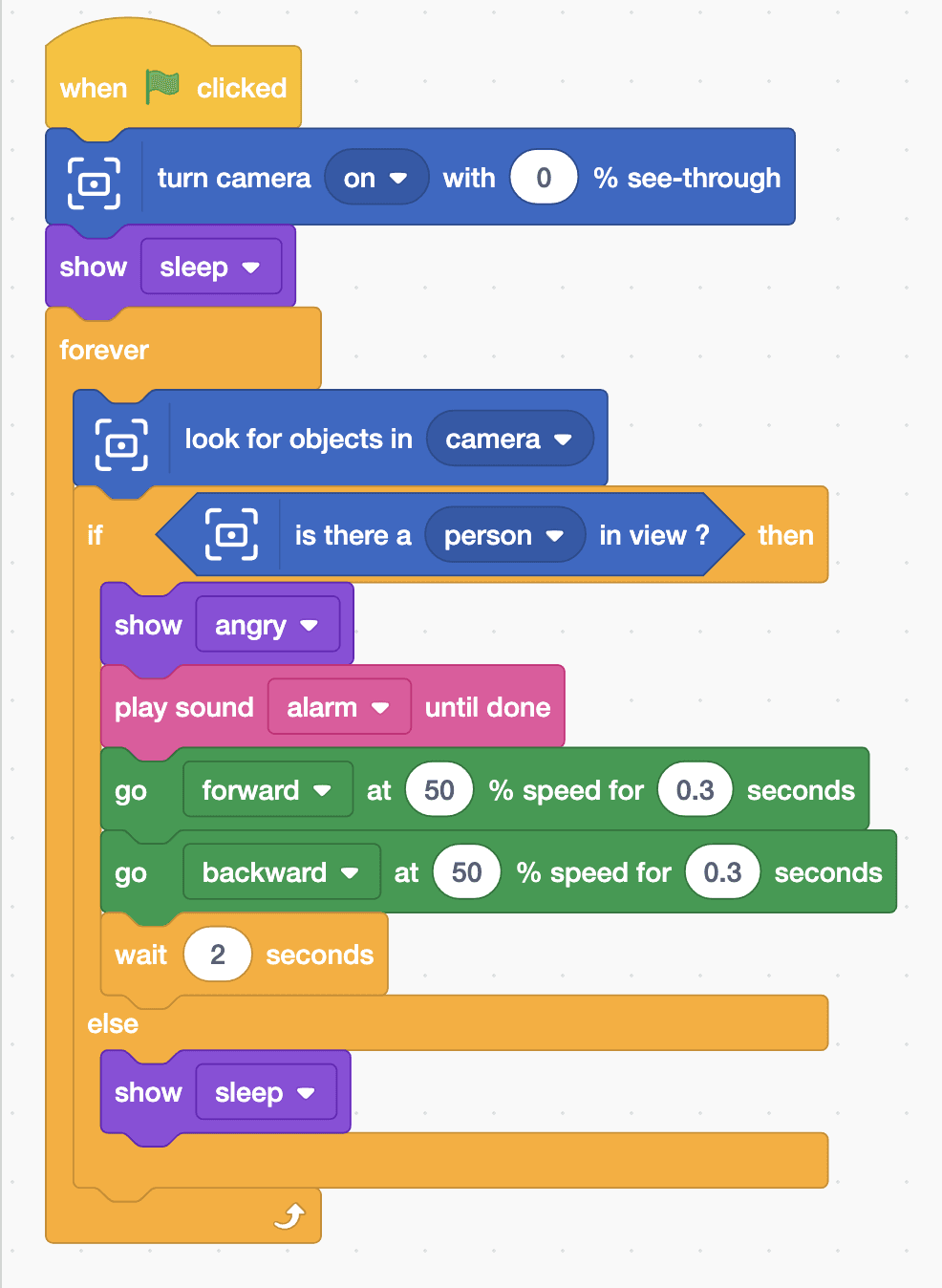
- Start with “when green flag clicked”, “turn camera on with 0 % see-through” and “show sleep”.
- Add a “forever” loop with “look for objects in camera” inside. Each time round, Object Sense checks a fresh picture.
- Under it, add “if … else” with “is there a person in view ?” in its slot.
- For a person: “show angry” and “play sound alarm until done”, then “go forward at 50 % speed for 0.3 seconds” and “go backward at 50 % speed for 0.3 seconds”. Add “wait 2 seconds” so MIEO doesn't bark nonstop.
- For nobody: put “show sleep” in the else part.
- Click the green flag, allow the camera, step out of view and then walk back in.
Arena mode: the program runs on your computer and talks to MIEO live over USB or Bluetooth, so keep MIEO switched on and connected.
when green flag clicked
turn camera [on v] with (0) % see-through
show [sleep v]
forever
  look for objects in [camera v]
  if <is there a [person v] in view ?> then
    show [angry v]
    play sound [alarm v] until done
    go [forward v] at (50) % speed for (0.3) seconds
    go [backward v] at (50) % speed for (0.3) seconds
    wait (2) seconds
  else
    show [sleep v]
  end
endTest it
Click the green flag and your camera picture appears on the stage. With nobody in view, MIEO shows a sleepy face. Walk into the picture and it turns angry, sounds the alarm and lunges forward and back, then waits. While you stay in view it keeps guarding; step away and it falls asleep again.
If it doesn't work
- MIEO is always angry? You're probably still in the picture. Point the camera away from your seat, towards the door.
- It doesn't notice you? Light the room well and step further back, so more of your body is in the picture.
- MIEO creeps across the table? Keep the forward and backward moves exactly the same speed and time.
Make it your own
- Easy: change the alarm to another sound, or the angry face to surprise.
- Medium: guard against cats too. Use the green “or” block to check for a person or a cat.
- Hard: count visitors with a variable that goes up once each time someone walks in, not every time round the loop.