QR Code Recognition System
Scan QR codes to give MIEO commands and clues
What you'll build
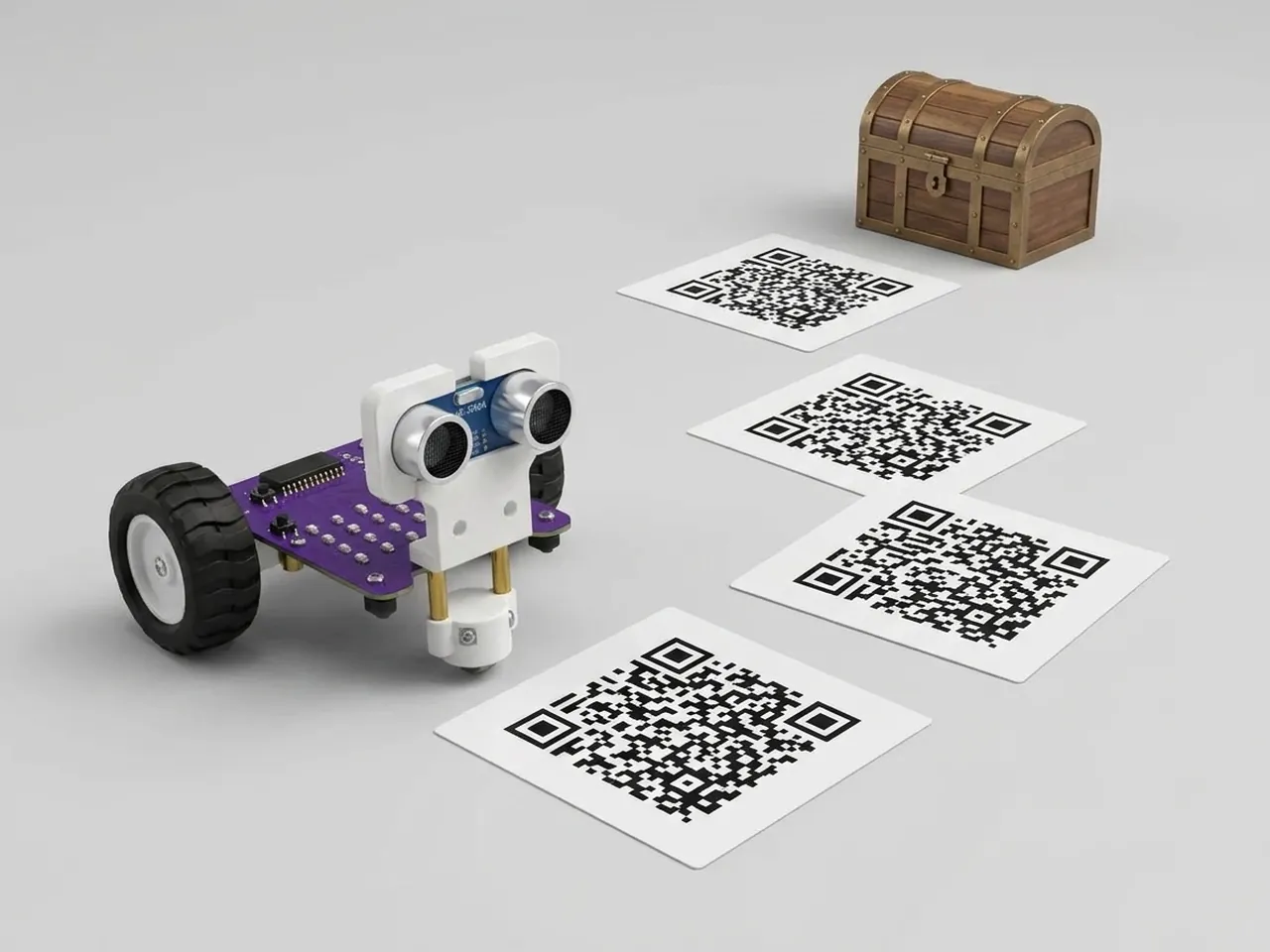
A QR code is a square of black and white blocks that hides a message, like a word or a web address. Scan Sense reads QR codes through your computer's webcam, with no internet needed. In this project you make five command cards: go, left, right, dance and win. Show a card to the camera and MIEO obeys it, once each time a card appears. Lay a trail of moves to lead MIEO to a treasure, then play it back card by card.
What you'll learn
- What a QR code is: a picture that stores a message
- Starting a script when a particular code is seen
- Planning a route as a list of commands
- Why the robot acts once per card, not over and over
You'll need
- Mieo board
- Two N20 motors and their wheels
- Battery
- 3D-printed mountings
- Caster wheel
- Screws and screwdriver
- Five printed QR codes saying go, left, right, dance and win
- A webcam; most laptops have one built in
- A computer with Bluetooth
- The Robolab app (free)
- A webcam (most laptops have one built in)
Stay safe
- Ask an adult to help with the small screws.
- Lift MIEO's wheels off the table before you upload a driving program, so it can't drive off the edge.
- The camera and microphone stay on your computer. Nothing MIEO sees or hears is sent anywhere.
Build it
- Build MIEO with both N20 motors, their wheels, the caster wheel and the battery, as in Switch Motor Start.
- Ask an adult to make five QR codes with a free QR code maker, one for each word: go, left, right, dance and win. Print them on card, one per card.
- Put a small “treasure” on the floor a short way from MIEO, round a corner.
- Switch MIEO on and connect it to your computer over Bluetooth.
Code it

Want MIEO Bot to guide you?
Robolab's built-in tutor has a lesson on the same idea, “Code Card Driver”. Open MIEO Bot in Robolab, pick Pro, then Mieo, and it shows you the blocks one at a time and checks your work as you go.
About MIEO Bot's lessons- Open Robolab, choose Mieo, connect and set the switch at the top right to Arena. Add the Scan Sense extension.
- Start with “when green flag clicked”, “switch camera on with picture 0 % faded”, “show code outline” and “show think”, then a “forever” loop with “scan camera for a code” inside.
- Add “when a code saying go is found” with “show happy”, “go forward at 40 % speed for 1 seconds” and “show think”.
- Add the same kind of script for left and right, each with “go left” or “go right” at 40 % speed for 0.5 seconds.
- For dance: “show disco pattern”, “play sound happy” and “go right at 50 % speed for 2 seconds”. For win: “show heart” and “play sound win until done”. End each with “show think”.
- Click the green flag, allow the camera, and hold up the go card.
Arena mode: the program runs on your computer and talks to MIEO live over USB or Bluetooth, so keep MIEO switched on and connected.
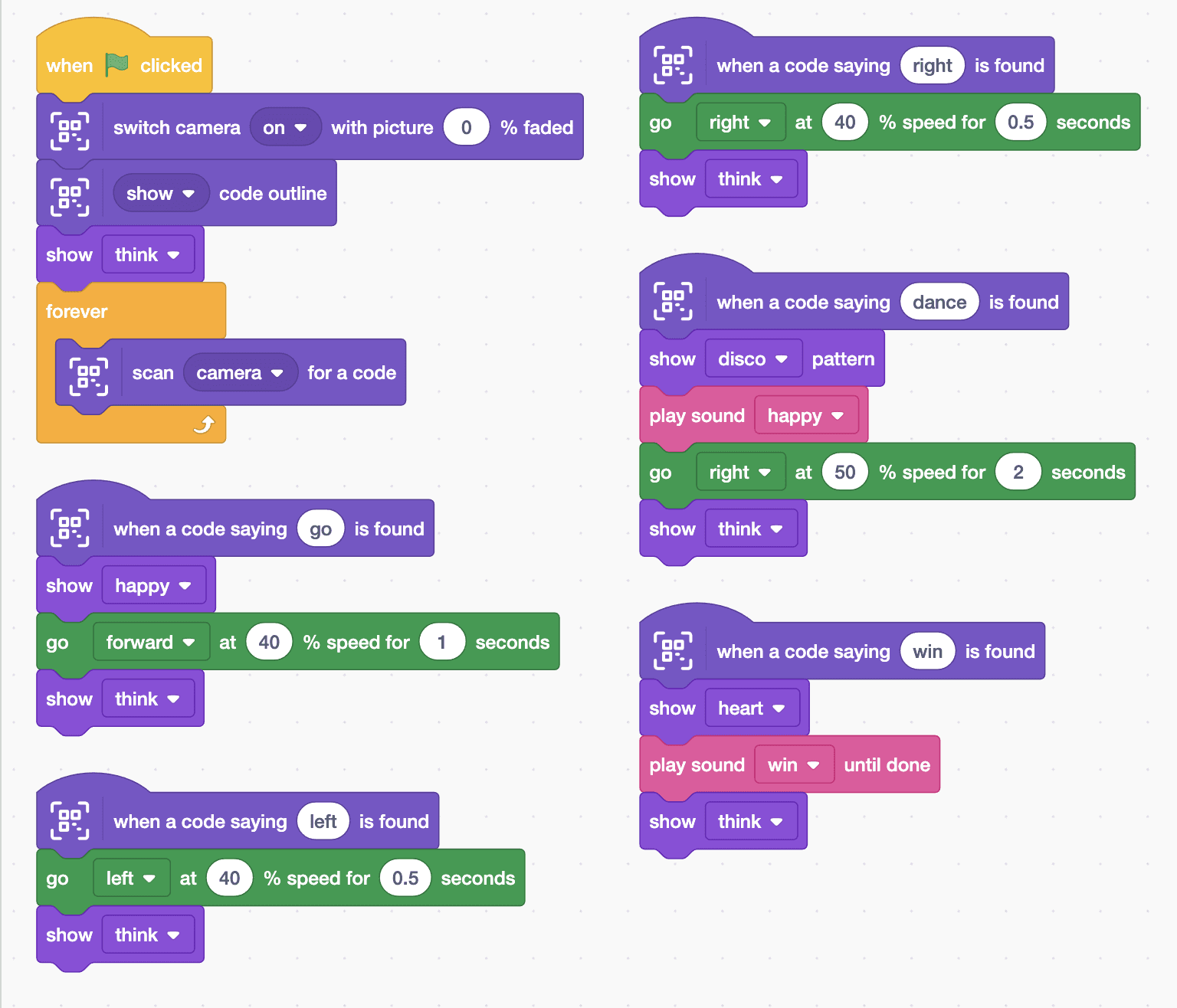
when green flag clicked
switch camera [on v] with picture (0) % faded
[show v] code outline
show [think v]
forever
  scan [camera v] for a code
end

when a code saying (go) is found
show [happy v]
go [forward v] at (40) % speed for (1) seconds
show [think v]

when a code saying (left) is found
go [left v] at (40) % speed for (0.5) seconds
show [think v]

when a code saying (right) is found
go [right v] at (40) % speed for (0.5) seconds
show [think v]

when a code saying (dance) is found
show [disco v] pattern
play sound [happy v]
go [right v] at (50) % speed for (2) seconds
show [think v]

when a code saying (win) is found
show [heart v]
play sound [win v] until done
show [think v]Test it
Click the green flag and the camera picture fills the stage. Hold up the go card: an outline appears round the code and MIEO drives forward for a second. Take the card away and show it again to repeat. Left and right make MIEO turn, dance makes it spin under disco lights, and win shows a heart with a fanfare. Use the cards to steer MIEO to the treasure.
If it doesn't work
- Nothing happens when you show a card? Hold it flat and still, close enough to fill about a quarter of the picture, in good light.
- A card works once and then stops? That's on purpose: take it out of view and show it again.
- MIEO turns too far or not far enough? Change the 0.5 seconds in the left and right scripts.
Make it your own
- Easy: add a card for back, with “go backward”.
- Medium: make a card that says a number, and use “code text” to drive forward for that many seconds.
- Hard: hide clue cards around the room so each one tells the next player where to go.