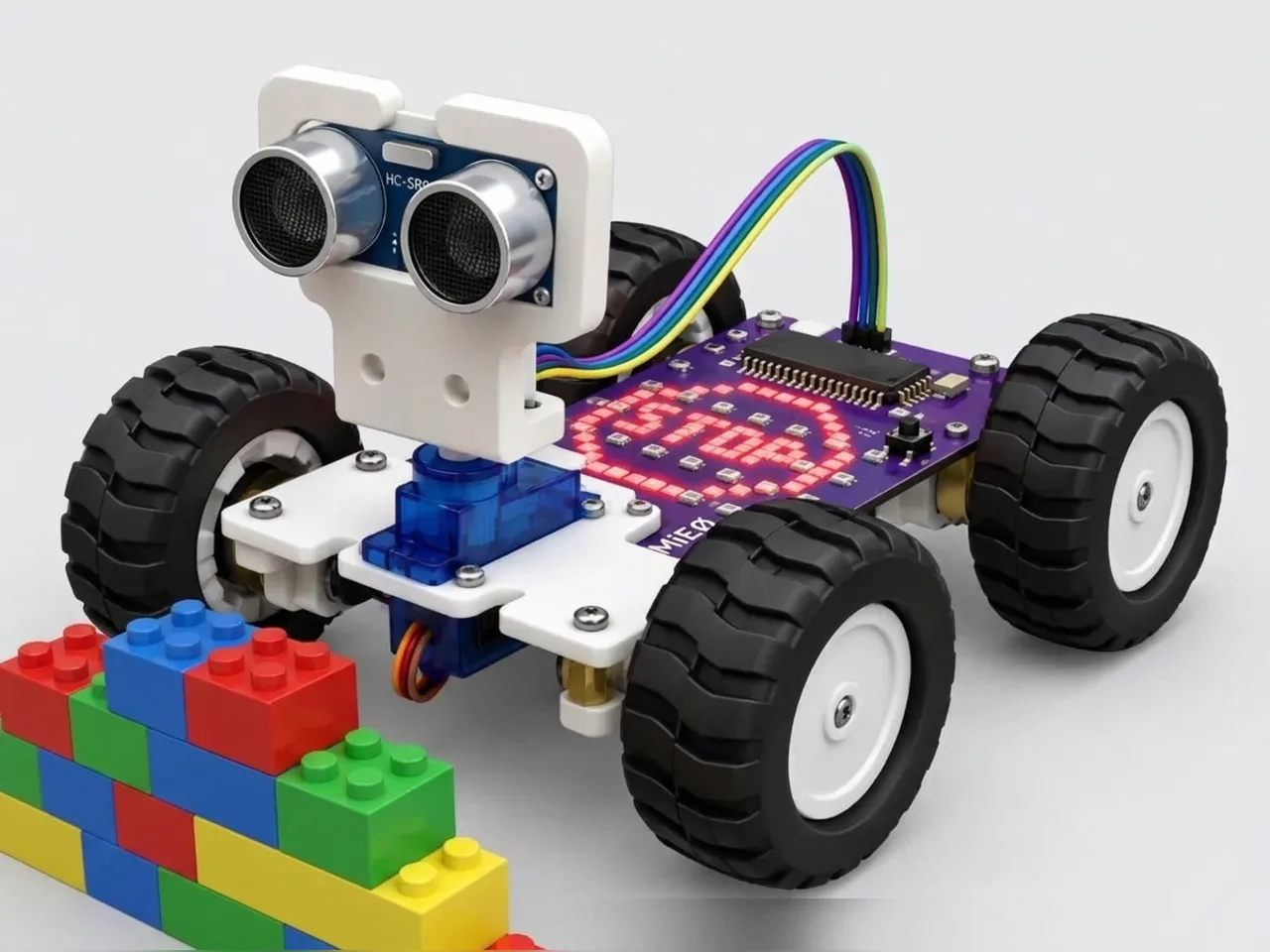
Obstacle Stopper Robot
Stop before hitting a wall using the distance sensor
What you'll build
MIEO's ultrasonic distance sensor works like a bat. It sends out a click of sound too high for you to hear, listens for the echo and times how long it takes to come back. The longer the wait, the further away the wall. In this project MIEO drives forward, measures again and again, and stops about 15 cm before anything in its way. Then it waits for you to point it somewhere new.
What you'll learn
- How an ultrasonic sensor measures distance with an echo
- Checking a sensor again and again inside a loop
- Why a reading of -1 means nothing answered
- Leaving room to stop: a robot can't halt instantly
You'll need
- Mieo board
- Two N20 motors and their wheels
- Battery
- 3D-printed mountings
- Caster wheel
- Screws and screwdriver
- Ultrasonic distance sensor and its cable
- A USB cable, or Bluetooth on your computer
- The Robolab app (free)
Stay safe
- Ask an adult to help with the small screws.
- Lift MIEO's wheels off the table before you upload a driving program, so it can't drive off the edge.
- Plug extra parts only into the connector this page names. Wiring a part to the wrong connector can damage it for good.
Build it
- Build MIEO with both N20 motors, their wheels, the caster wheel and the battery, as in Switch Motor Start.
- With MIEO switched off, plug in the ultrasonic distance sensor: its Echo pin goes to D1, its Trig pin to D2, and its power and ground pins to the matching pins, as your kit's build guide shows.
- Fix the sensor at the front of MIEO, with its two round “eyes” facing forward.
- Switch MIEO on and connect it to your computer with a USB cable or Bluetooth.
Code it

Want MIEO Bot to guide you?
Robolab's built-in tutor has a lesson on the same idea, “Stop Before the Wall”. Open MIEO Bot in Robolab, pick Maker, then Mieo, and it shows you the blocks one at a time and checks your work as you go.
About MIEO Bot's lessons- Open Robolab, choose Mieo, connect and set the switch at the top right to Upload. In the Variables group, make a variable called distance.
- Start with “when mieo starts up” and “connect ultrasonic 1 to echo D1 , trig D2” from Sense. Then add “show sleep”, “wait until is button L pressed?” and “show happy”.
- Add a “forever” loop. Its first block is “set distance to”, with “get ultrasonic 1 distance (cm)” in the gap.
- Add “if … else”. Its condition is “distance > 0 and distance < 15”, built from an “and” block with a “>” and a “<” inside.
- In the top part, add “stop robot”, “show surprise”, “play sound beep until done”, “wait until is button L pressed?” and “show happy”. In the else part, add “go forward at 40 % speed”.
- Lift the wheels and upload. Then point MIEO at a wall a metre or two away and press L.
Upload mode: Robolab turns your blocks into MicroPython and sends them to MIEO over USB or Bluetooth. MIEO then runs the program by itself, even after you unplug it.
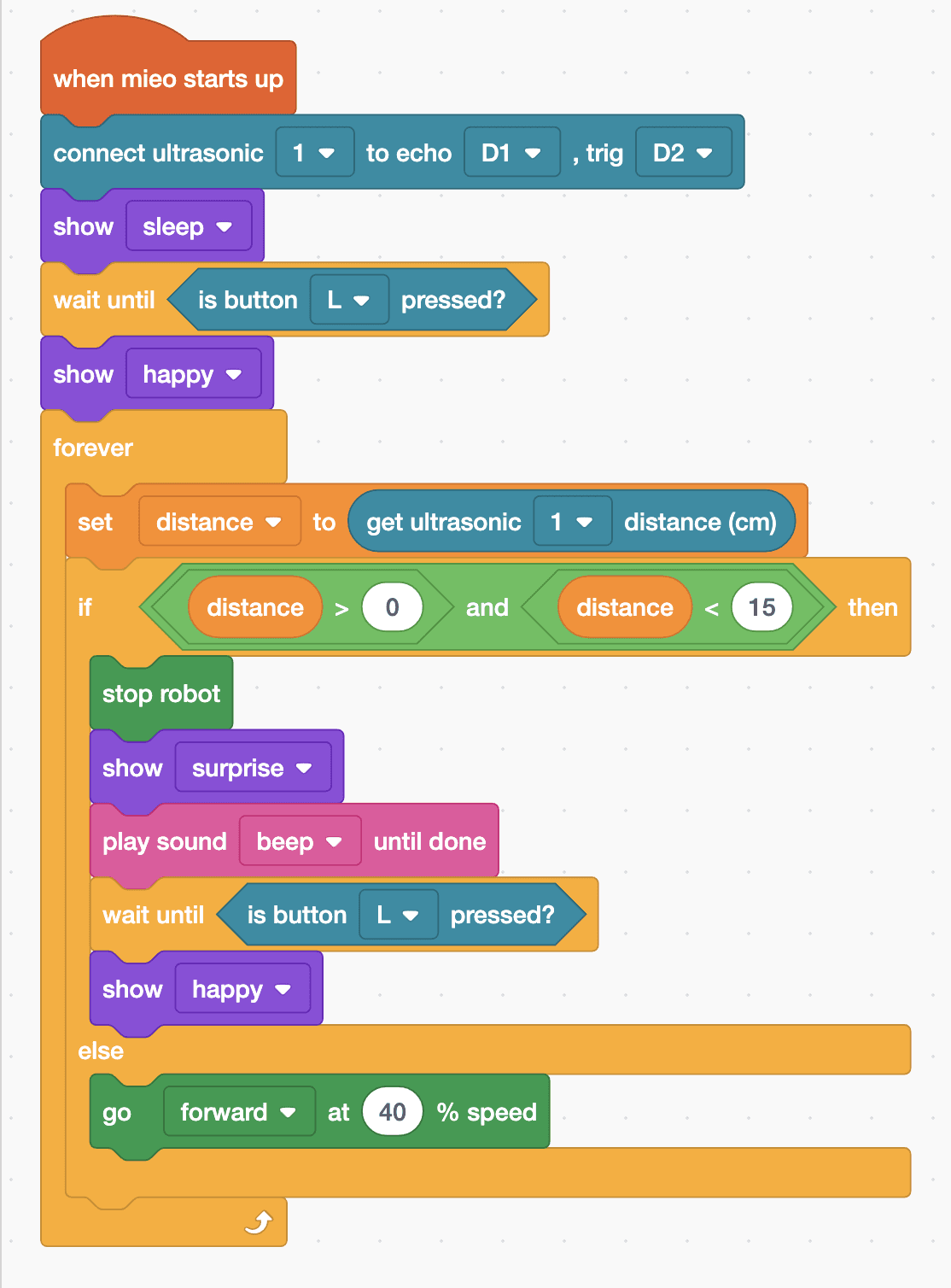
when mieo starts up
connect ultrasonic [1 v] to echo [D1 v] , trig [D2 v]
show [sleep v]
wait until <is button [L v] pressed?>
show [happy v]
forever
  set [distance v] to (get ultrasonic [1 v] distance (cm))
  if <<(distance) > (0)> and <(distance) < (15)>> then
    stop robot
    show [surprise v]
    play sound [beep v] until done
    wait until <is button [L v] pressed?>
    show [happy v]
  else
    go [forward v] at (40) % speed
  end
endSee the MicroPython
# generated by Robolab
import mieo

distance = 0

mieo.connectultrasonic(1, 'D1', 'D2')
mieo.showemotion('sleep')
while not mieo.button('L'):
   pass
mieo.showemotion('happy')
while True:
  distance = mieo.ultrasonic(1)
  if distance > 0 and distance < 15:
    mieo.stoprobot()
    mieo.showemotion('surprise')
    mieo.playsounduntildone('beep')
    while not mieo.button('L'):
       pass
    mieo.showemotion('happy')
  else:
    mieo.run('forward', 40)
Test it
MIEO sleeps until you press L, then smiles and drives towards the wall. About 15 cm away it stops, looks surprised and beeps. Turn it to face open space and press L again to set off. With nothing in front, the sensor hears no echo and reads -1, so MIEO keeps driving.
If it doesn't work
- MIEO bumps into the wall? It needs room to stop. Change 15 to 25, or drive more slowly.
- MIEO stops straight away with nothing in front? Check the Echo and Trig wires: Echo goes to D1 and Trig to D2. Swapped wires give no sensible reading.
- It doesn't stop for soft things like cushions or curtains? Soft surfaces swallow sound instead of echoing it, so test with a hard wall or a box.
Make it your own
- Easy: change the stopping distance and the speed. What's the fastest MIEO can go and still stop in time?
- Medium: instead of waiting for L, make MIEO back up and turn by itself, then drive on.
- Hard: make MIEO slow down as it gets closer, by working out its speed from the distance.