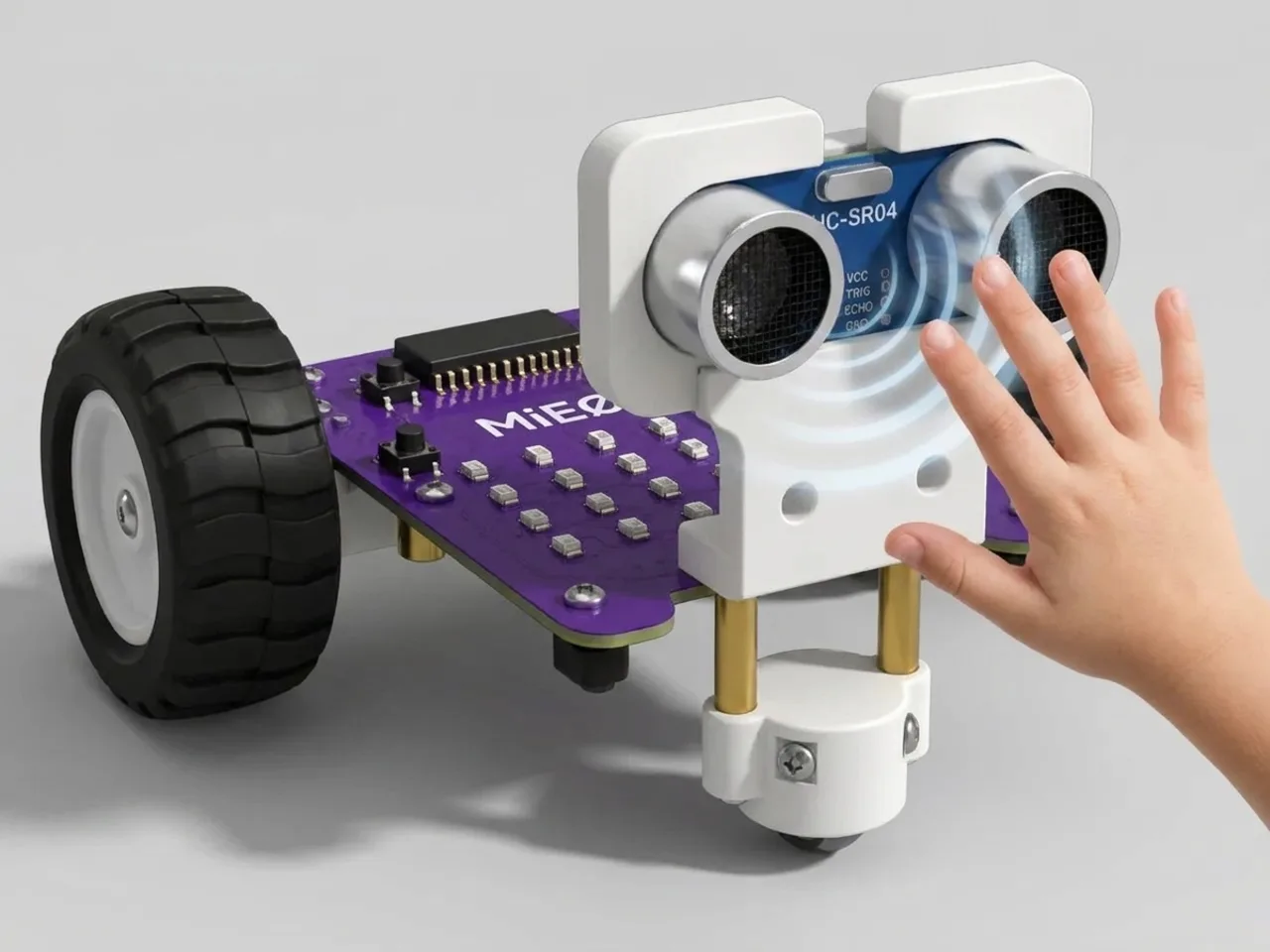
Echo Meter
Beep faster as your hand gets closer to MIEO
What you'll build
Cars have parking sensors that beep slowly when a wall is far away and faster and faster as it gets closer. In this project you build one with MIEO. The ultrasonic sensor measures how far away your hand is, and MIEO uses that number to decide how long to wait between beeps. Closer means a shorter wait, so the beeps speed up until they almost join together.
What you'll learn
- Turning a sensor reading into a sound you can hear
- Using a measurement to set a waiting time with division
- Reading the sensor once into a variable, then using that number
- Ignoring readings that don't make sense, like -1
You'll need
- Mieo board
- Battery
- 3D-printed mountings
- Screws and screwdriver
- Ultrasonic distance sensor and its cable
- A USB cable, or Bluetooth on your computer
- The Robolab app (free)
Stay safe
- Ask an adult to help with the small screws.
- Plug extra parts only into the connector this page names. Wiring a part to the wrong connector can damage it for good.
Build it
- Fit the battery into its 3D-printed mounting on the back of the Mieo board and fix it in place with the screws.
- With MIEO switched off, plug in the ultrasonic distance sensor: its Echo pin goes to D1, its Trig pin to D2, and its power and ground pins to the matching pins, as your kit's build guide shows.
- Stand MIEO on the table with the sensor's two round “eyes” facing you, then switch it on and connect it to your computer.
Code it
- Open Robolab, choose Mieo, connect and set the switch at the top right to Upload. In the Variables group, make a variable called distance.
- Start with “when mieo starts up”, “connect ultrasonic 1 to echo D1 , trig D2” and “show neutral”, then add a “forever” loop.
- Inside the loop, add “set distance to” with “get ultrasonic 1 distance (cm)” in the gap.
- Add “if … then” with “distance > 0 and distance < 50” as its condition. Anything further away, or a reading of -1, stays silent.
- Inside the if, add “play freq 1500 Hz for duration 50 ms” from Speaker, then “wait” with “distance / 100” in its gap. At 50 cm that's half a second between beeps; at 5 cm it's a twentieth.
- Upload, then move your hand slowly towards the sensor.
Upload mode: Robolab turns your blocks into MicroPython and sends them to MIEO over USB or Bluetooth. MIEO then runs the program by itself, even after you unplug it.
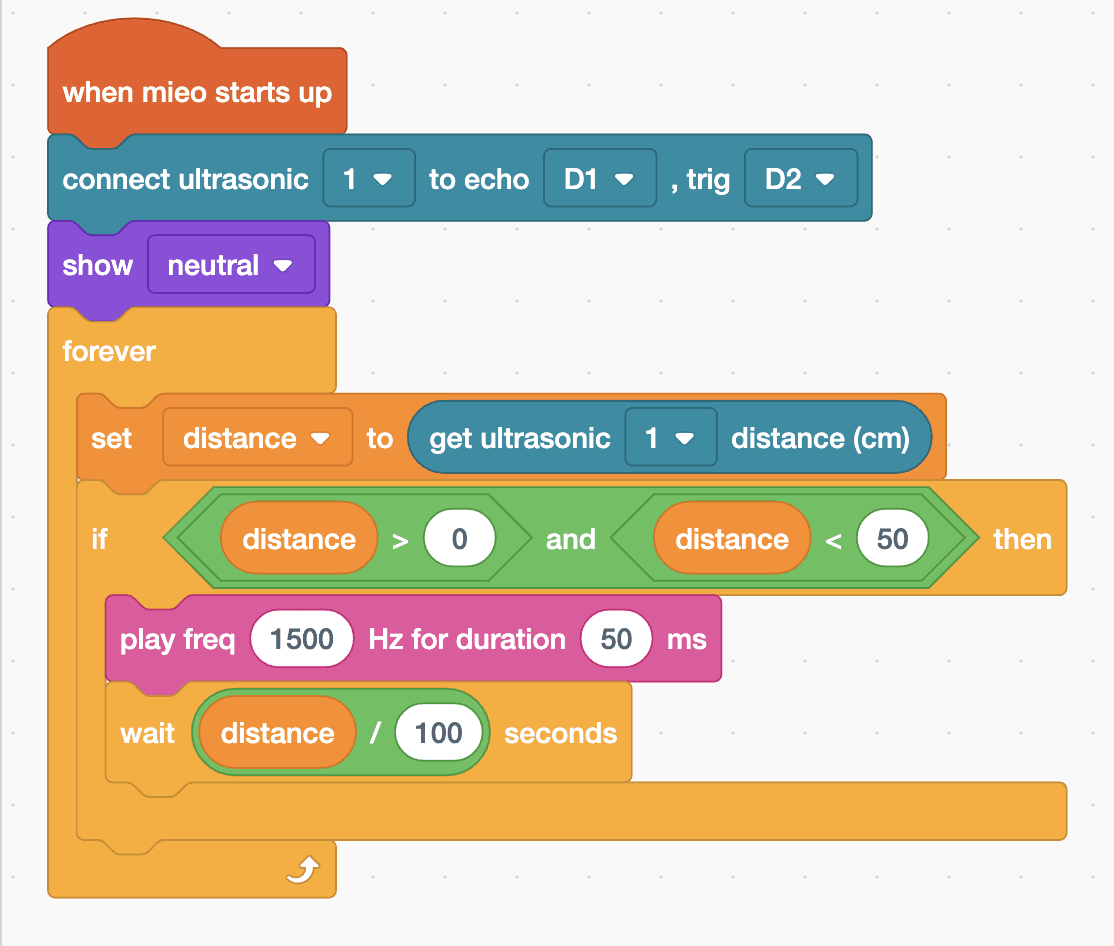
when mieo starts up
connect ultrasonic [1 v] to echo [D1 v] , trig [D2 v]
show [neutral v]
forever
  set [distance v] to (get ultrasonic [1 v] distance (cm))
  if <<(distance) > (0)> and <(distance) < (50)>> then
    play freq (1500) Hz for duration (50) ms
    wait ((distance) / (100)) seconds
  end
endSee the MicroPython
# generated by Robolab
import mieo

distance = 0

mieo.connectultrasonic(1, 'D1', 'D2')
mieo.showemotion('neutral')
while True:
  distance = mieo.ultrasonic(1)
  if distance > 0 and distance < 50:
    mieo.playfreq(1500, 50)
    mieo.sleep((distance / 100) * 1000)
Test it
With nothing in front of the sensor, MIEO is quiet. Hold your hand about 50 cm away and you hear slow beeps. Move it closer and the beeps get faster, until they almost join into one buzz when your hand is a few centimetres away. Pull your hand back and they slow down again.
If it doesn't work
- No beeps at all? Check that Echo is in D1 and Trig in D2, and that the connect block comes before the forever loop.
- The beeps are random when nothing is there? Something else is in range, such as a wall or a person behind you. Point MIEO at open space, or change 50 to 30.
- The beeps never get fast? Check that the wait uses “distance / 100”, not a fixed number.
Make it your own
- Easy: change 1500 to a higher or lower number to pick the beep you like best.
- Medium: show a face as well: happy when your hand is far away and surprise when it's very close.
- Hard: make the beep higher as well as faster when something gets closer, by working out the frequency from the distance.
What to build next
Sensing
Distance Alert System
Show green, yellow or red as something gets closer
Sensing
Line Sensor Response System
MIEO reacts when its line sensors see black or white
Self-driving
Line Follower Robot
Follow the black line on the line follower chart by itself