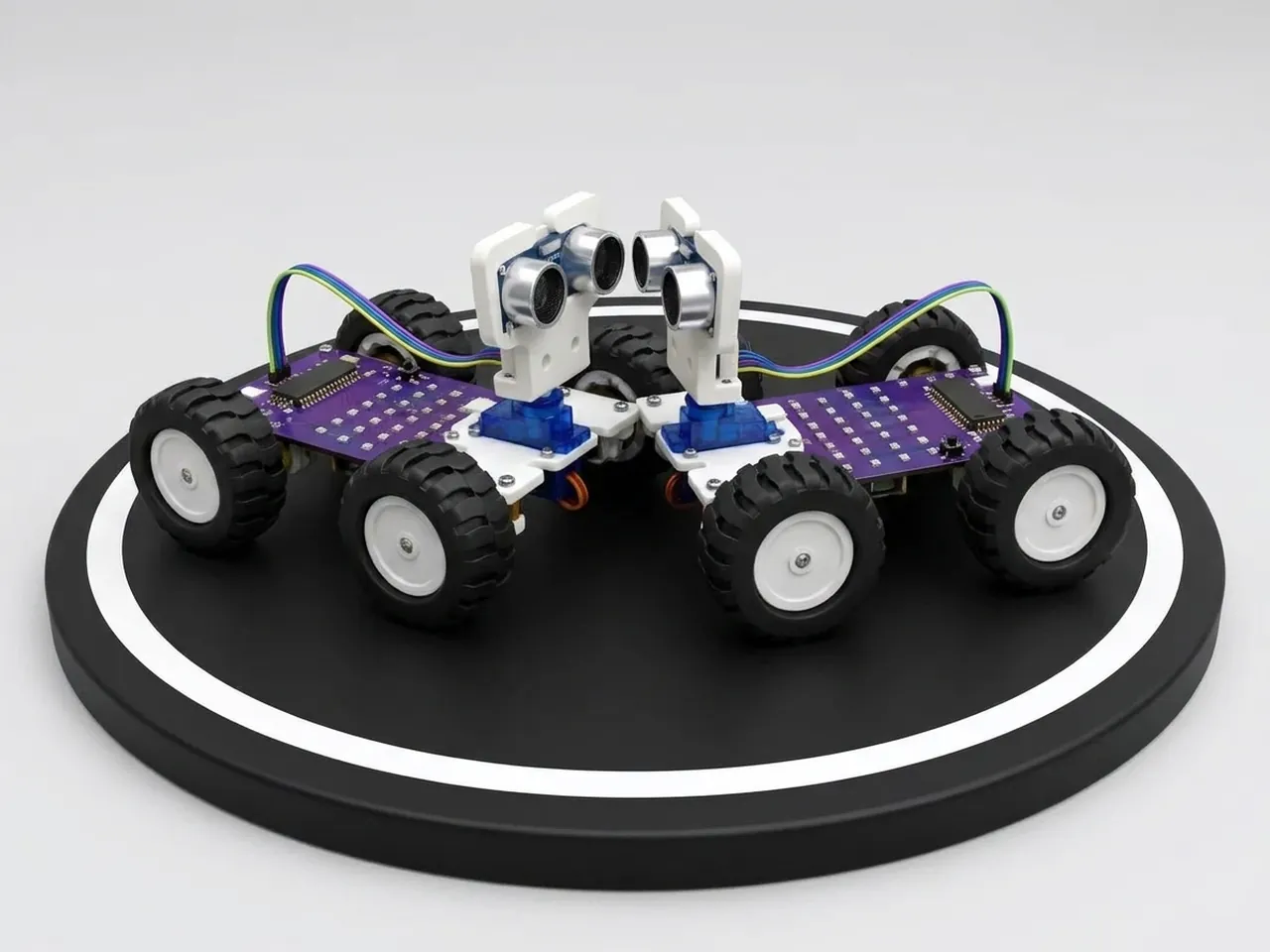
Sumo Push Bot
Push your opponent out of the ring without leaving it
What you'll build
In robot sumo, two robots start in a white ring with a black edge. The first to push the other out wins, and nobody touches the robots once the match starts. MIEO needs three skills: stay inside the ring by watching for the black edge with its line sensors, find the opponent by spinning and looking with its ultrasonic sensor, and charge at full speed once it's found. Staying in the ring always comes first, because a robot that drives itself out loses straight away.
What you'll learn
- Ranking behaviours: staying in the ring comes before attacking
- Searching by spinning until a sensor finds something
- Using the line sensors as an edge detector
- Planning a strategy and testing it against an opponent
You'll need
- Mieo board
- Two N20 motors and their wheels
- Battery
- 3D-printed mountings
- Caster wheel
- Screws and screwdriver
- Ultrasonic distance sensor and its cable
- Sumo robot parts, from the Mieo Pro kit
- A ring: a white circle about 80 cm across with a thick black edge
- A USB cable, or Bluetooth on your computer
- The Robolab app (free)
Stay safe
- Ask an adult to help with the small screws.
- Lift MIEO's wheels off the table before you upload a driving program, so it can't drive off the edge.
- Plug extra parts only into the connector this page names. Wiring a part to the wrong connector can damage it for good.
Build it
- Build the sumo robot from your Mieo Pro kit, with both N20 motors, their wheels, the caster wheel and the battery, as the Mieo Pro build guide shows.
- With MIEO switched off, plug in the ultrasonic sensor low at the front: Echo to D1, Trig to D2, and its power and ground pins to the matching pins.
- Make the ring: a large sheet of white card or paper with a 5 cm black border of tape or paint around a circle about 80 cm across.
- Switch MIEO on and connect it to your computer.
Code it
- Open Robolab, choose Mieo, connect and set the switch at the top right to Upload. Make a variable called distance.
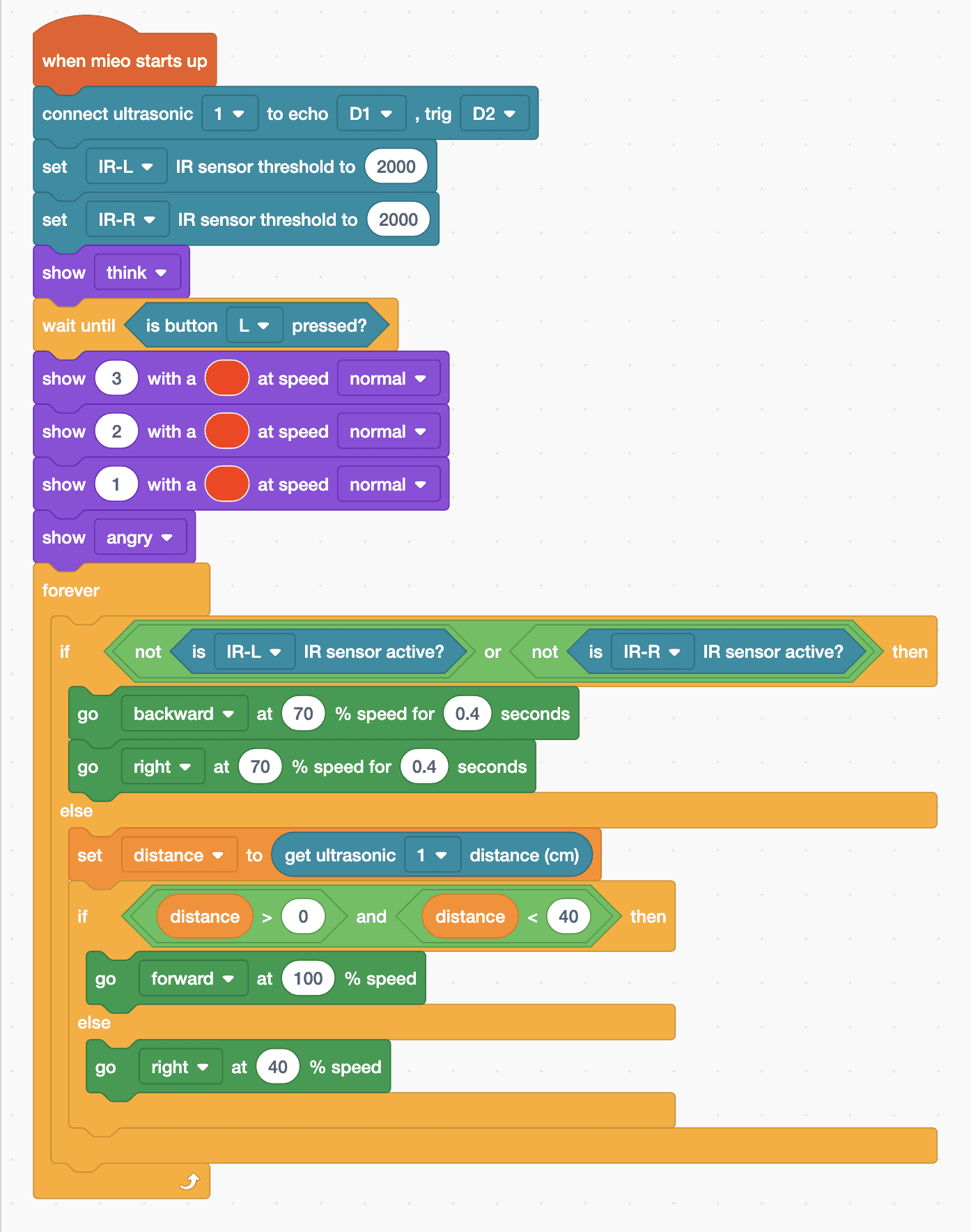
- Start with “when mieo starts up”, “connect ultrasonic 1 to echo D1 , trig D2”, and “set IR-L IR sensor threshold to 2000” and the same for IR-R. Then “show think” and “wait until is button L pressed?”.
- Count down, as the rules ask: “show 3 with a … at speed normal”, then 2, then 1. A single character stays on the display for one second. Then “show angry”.
- Add a “forever” loop with “if … else”. The condition is “not is IR-L IR sensor active? or not is IR-R IR sensor active?”: a sensor that isn't active is over the black edge.
- Edge: in the top part, back away with “go backward at 70 % speed for 0.4 seconds” and turn with “go right at 70 % speed for 0.4 seconds”.
- Otherwise, “set distance to (get ultrasonic 1 distance (cm))” and add “if … else” with “distance > 0 and distance < 40”: charge with “go forward at 100 % speed”, or search with “go right at 40 % speed”.
- Lift the wheels and upload. Put both robots in the ring facing away from each other and press L on both.
Upload mode: Robolab turns your blocks into MicroPython and sends them to MIEO over USB or Bluetooth. MIEO then runs the program by itself, even after you unplug it.
when mieo starts up
connect ultrasonic [1 v] to echo [D1 v] , trig [D2 v]
set [IR-L v] IR sensor threshold to (2000)
set [IR-R v] IR sensor threshold to (2000)
show [think v]
wait until <is button [L v] pressed?>
show (3) with a (#F30) at speed [normal v]
show (2) with a (#F30) at speed [normal v]
show (1) with a (#F30) at speed [normal v]
show [angry v]
forever
  if <<not <is [IR-L v] IR sensor active?>> or <not <is [IR-R v] IR sensor active?>>> then
    go [backward v] at (70) % speed for (0.4) seconds
    go [right v] at (70) % speed for (0.4) seconds
  else
    set [distance v] to (get ultrasonic [1 v] distance (cm))
    if <<(distance) > (0)> and <(distance) < (40)>> then
      go [forward v] at (100) % speed
    else
      go [right v] at (40) % speed
    end
  end
endSee the MicroPython
# generated by Robolab
import mieo

distance = 0

mieo.connectultrasonic(1, 'D1', 'D2')
mieo.setirthreshold('IR-L', 2000)
mieo.setirthreshold('IR-R', 2000)
mieo.showemotion('think')
while not mieo.button('L'):
   pass
mieo.showtext('3', '#FF3300', 'normal')
mieo.showtext('2', '#FF3300', 'normal')
mieo.showtext('1', '#FF3300', 'normal')
mieo.showemotion('angry')
while True:
  if not mieo.iractive('IR-L') or not mieo.iractive('IR-R'):
    mieo.run('backward', 70)
    mieo.sleep(0.4 * 1000)
    mieo.stoprobot()
    mieo.run('right', 70)
    mieo.sleep(0.4 * 1000)
    mieo.stoprobot()
  else:
    distance = mieo.ultrasonic(1)
    if distance > 0 and distance < 40:
      mieo.run('forward', 100)
    else:
      mieo.run('right', 40)
Test it
Press L: MIEO counts down 3, 2, 1 on its display and turns angry. It spins slowly, searching. When the other robot comes within 40 cm, it charges at full speed. Whenever either line sensor reaches the black edge, MIEO backs off and turns before carrying on, so it stays in the ring while it pushes the other robot out.
If it doesn't work
- MIEO drives straight out of the ring? Your threshold doesn't suit your ring. Measure each sensor over white and over black in Arena mode, and pick a number in between.
- It spins past the other robot without charging? Lower the sensor so it points at the other robot's body, or search more slowly.
- It backs away all the time in the middle of the ring? The white isn't white enough to the sensors. Use brighter paper, or lower the threshold.
Make it your own
- Easy: search to the left instead of the right, and see which works better against your opponent.
- Medium: when MIEO backs away from the edge, turn away from whichever sensor saw it.
- Hard: hold a three-match tournament with fair rules: same ring, same start positions, and no touching once the countdown ends.