Battle Bot
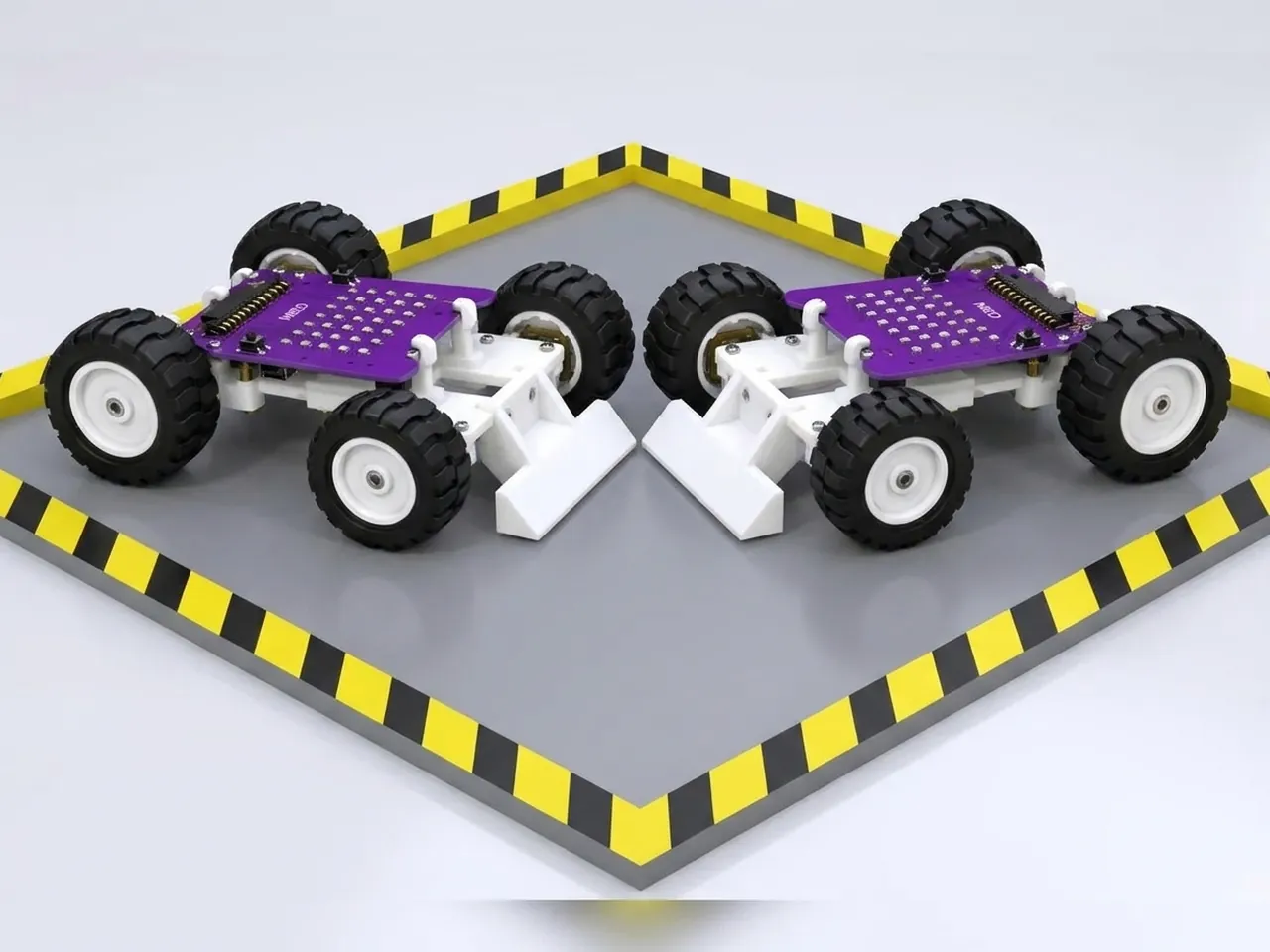
Build a wedge bot and play a fair bump battle
What you'll build
This is a battle with rules that keep it fair and keep every robot in one piece. Two wedge bots go into a walled arena for a round of about a minute. Each one hunts with its ultrasonic sensor, drives in to bump the other, then backs straight off: no pinning, no pushing into walls. Every bump counts as a hit, and when the round ends, each robot scrolls its score. The best bot is the one that finds its opponent fastest and lands the most clean bumps.
What you'll learn
- Timing a round by counting the times round a loop
- Hunting, attacking and backing off as separate behaviours
- Counting hits with a variable and showing the score
- Designing a fair game: rules that protect the robots
You'll need
- Mieo board
- Two N20 motors and their wheels
- Battery
- 3D-printed mountings
- Caster wheel
- Screws and screwdriver
- Ultrasonic distance sensor and its cable
- Wedge and armour parts, from the Mieo Pro kit
- A walled arena, such as a large cardboard box with low sides
- A USB cable, or Bluetooth on your computer
- The Robolab app (free)
Stay safe
- Ask an adult to help with the small screws.
- Lift MIEO's wheels off the table before you upload a driving program, so it can't drive off the edge.
- Plug extra parts only into the connector this page names. Wiring a part to the wrong connector can damage it for good.
Build it
- Build the battle bot from your Mieo Pro kit, with both N20 motors, their wheels, the caster wheel and the battery, and fit the smooth wedge at the front, as the Mieo Pro build guide shows.
- With MIEO switched off, plug in the ultrasonic sensor just above the wedge: Echo to D1, Trig to D2, and its power and ground pins to the matching pins.
- Make the arena: a smooth floor about 1 metre square with low walls all round. Check there are no sharp edges on any robot.
- Switch MIEO on and connect it to your computer.
Code it
- Open Robolab, choose Mieo, connect and set the switch at the top right to Upload. Make two variables, distance and hits.
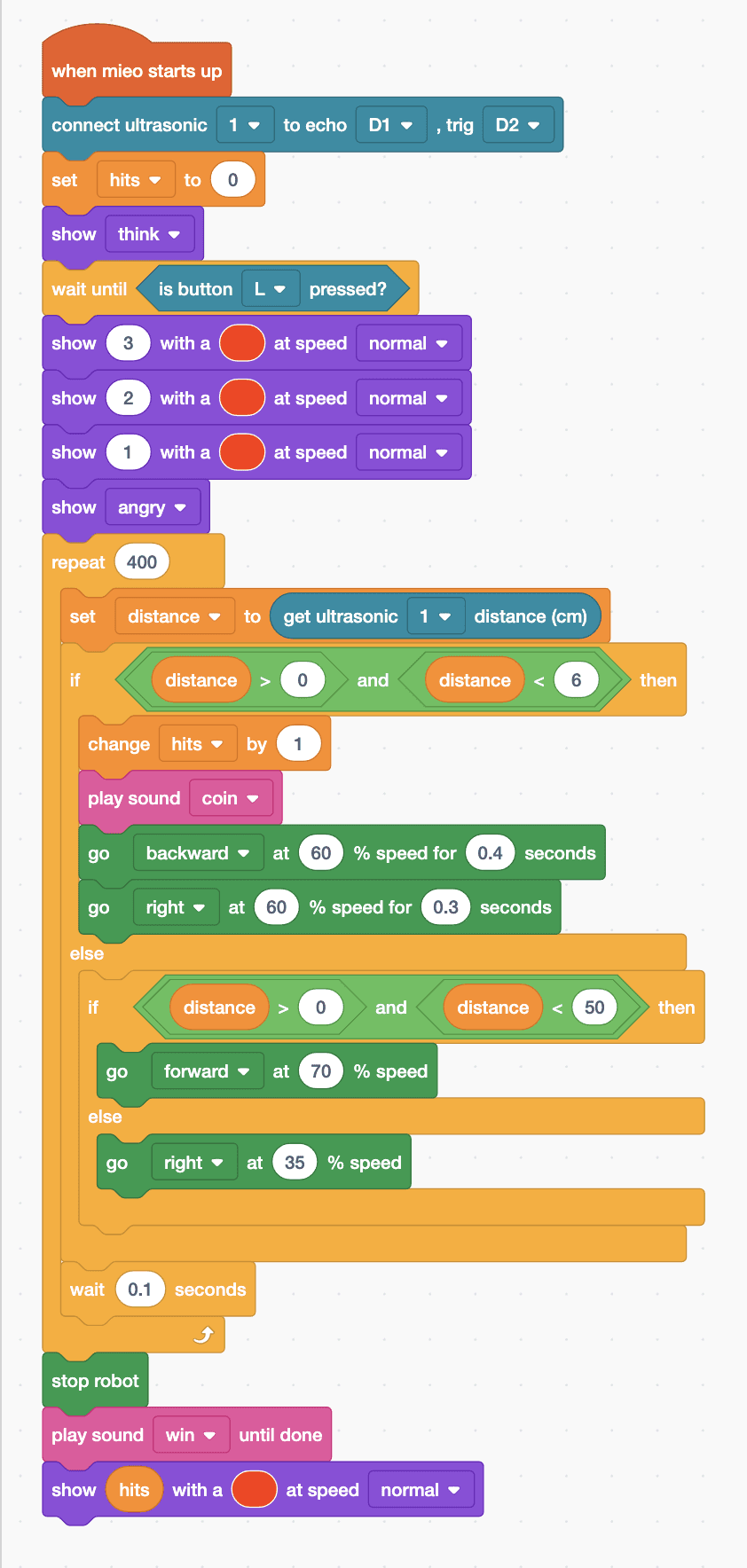
- Start with “when mieo starts up”, “connect ultrasonic 1 to echo D1 , trig D2”, “set hits to 0”, “show think” and “wait until is button L pressed?”. Count down by showing 3, 2 and 1, then “show angry”.
- The round: add “repeat 400” with “set distance to (get ultrasonic 1 distance (cm))” inside. Each time round takes a little over a tenth of a second, so 400 makes about a minute.
- Inside the repeat, add “if … else” with “distance > 0 and distance < 6”. Bump: “change hits by 1”, “play sound coin”, “go backward at 60 % speed for 0.4 seconds” and “go right at 60 % speed for 0.3 seconds”.
- In the else part, add “if … else” with “distance > 0 and distance < 50”: attack with “go forward at 70 % speed”, or hunt with “go right at 35 % speed”.
- At the end of the repeat, add “wait 0.1 seconds”. After the repeat: “stop robot”, “play sound win until done” and “show (hits) with a … at speed normal”.
- Lift the wheels and upload. Put both bots in opposite corners and press L on both at once.
Upload mode: Robolab turns your blocks into MicroPython and sends them to MIEO over USB or Bluetooth. MIEO then runs the program by itself, even after you unplug it.
when mieo starts up
connect ultrasonic [1 v] to echo [D1 v] , trig [D2 v]
set [hits v] to (0)
show [think v]
wait until <is button [L v] pressed?>
show (3) with a (#F30) at speed [normal v]
show (2) with a (#F30) at speed [normal v]
show (1) with a (#F30) at speed [normal v]
show [angry v]
repeat (400)
  set [distance v] to (get ultrasonic [1 v] distance (cm))
  if <<(distance) > (0)> and <(distance) < (6)>> then
    change [hits v] by (1)
    play sound [coin v]
    go [backward v] at (60) % speed for (0.4) seconds
    go [right v] at (60) % speed for (0.3) seconds
  else
    if <<(distance) > (0)> and <(distance) < (50)>> then
      go [forward v] at (70) % speed
    else
      go [right v] at (35) % speed
    end
  end
  wait (0.1) seconds
end
stop robot
play sound [win v] until done
show (hits) with a (#F30) at speed [normal v]See the MicroPython
# generated by Robolab
import mieo

hits = 0
distance = 0

mieo.connectultrasonic(1, 'D1', 'D2')
hits = 0
mieo.showemotion('think')
while not mieo.button('L'):
   pass
mieo.showtext('3', '#FF3300', 'normal')
mieo.showtext('2', '#FF3300', 'normal')
mieo.showtext('1', '#FF3300', 'normal')
mieo.showemotion('angry')
for count in range(400):
  distance = mieo.ultrasonic(1)
  if distance > 0 and distance < 6:
    hits += 1
    mieo.playsound('coin')
    mieo.run('backward', 60)
    mieo.sleep(0.4 * 1000)
    mieo.stoprobot()
    mieo.run('right', 60)
    mieo.sleep(0.3 * 1000)
    mieo.stoprobot()
  else:
    if distance > 0 and distance < 50:
      mieo.run('forward', 70)
    else:
      mieo.run('right', 35)
  mieo.sleep(0.1 * 1000)
mieo.stoprobot()
mieo.playsounduntildone('win')
mieo.showtext(hits, '#FF3300', 'normal')
Test it
Press L: MIEO counts down 3, 2, 1 and turns angry. It spins slowly until it finds the other bot, drives at it, and the moment it's within about 6 cm it plays a coin sound, backs off and turns away before hunting again. After about a minute it stops, plays its win sound and scrolls the number of hits it landed.
If it doesn't work
- It counts hits on the walls? The walls are close enough to look like a robot. Use a bigger arena, or count only when it was attacking.
- It never finds the other bot? Point the sensor at the height of the other bot's body, not over the top of it.
- The round is much longer or shorter than a minute? Change 400: more makes the round longer.
Make it your own
- Easy: change the hunting direction or speed and see whether your bot finds its opponent faster.
- Medium: make the bot show a different face for each behaviour: think while hunting, angry while attacking, surprise after a bump.
- Hard: write the rules for a class tournament, with rounds, a referee and points, and test them with three or more bots.