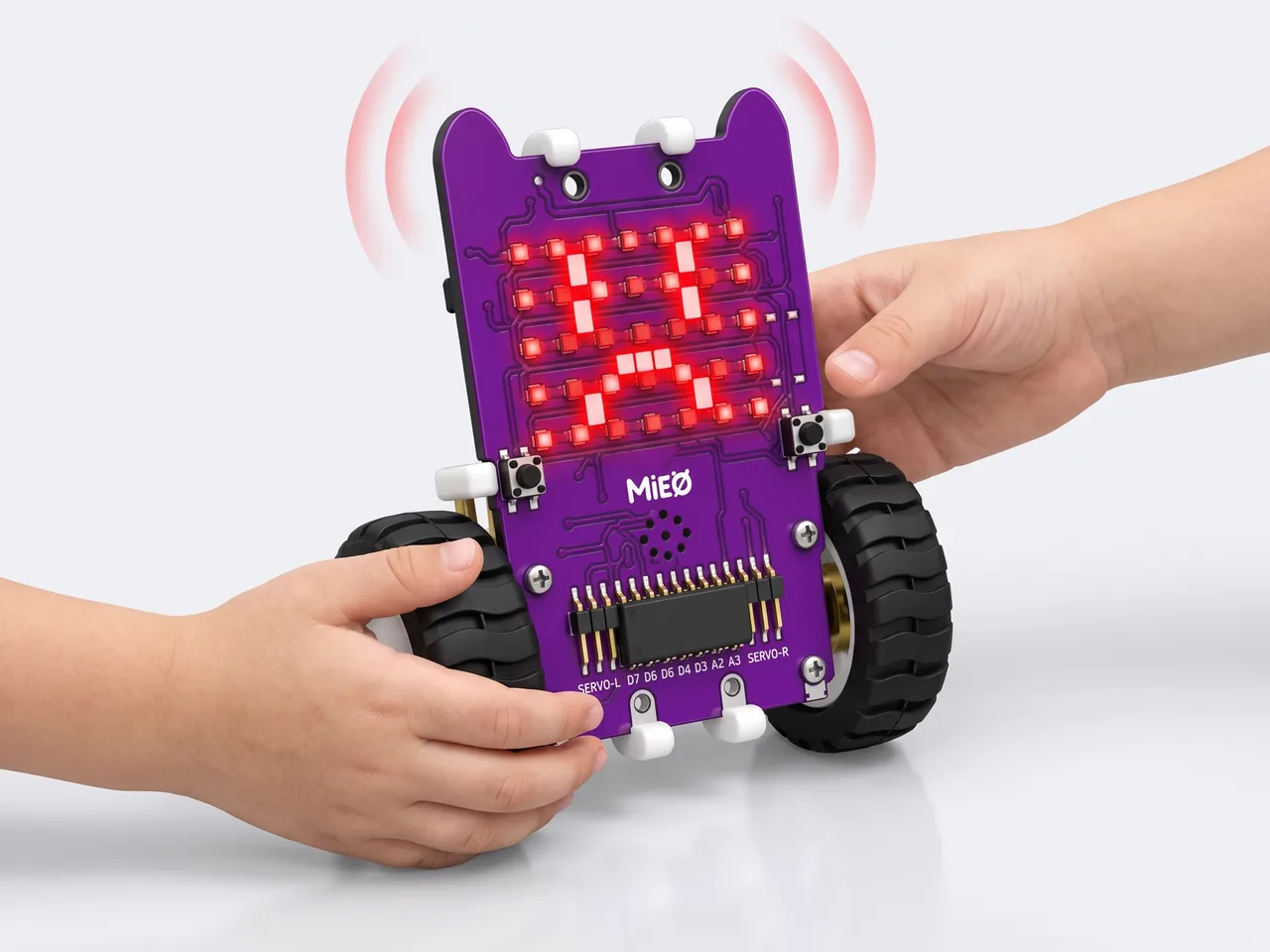
Hot Potato Game
Pass MIEO round until it sounds the alarm: whoever holds it is out
What you'll build
Hot Potato is a game for three or more players, and MIEO is the potato. Press the L button and MIEO smiles: start passing it from hand to hand around the circle. Somewhere between 3 and 10 seconds later, MIEO suddenly turns angry and sounds its alarm, and whoever is holding it is out. Nobody knows exactly when, not even you, because MIEO picks the time at random. Then it falls asleep, ready for the next round. The program runs in Robolab on your computer and talks to MIEO over Bluetooth, so MIEO can travel round the circle without a cable.
What you'll learn
- Using “pick random” so a program does something different every time
- Waiting for a button press with “wait until”
- Using a “forever” loop to play round after round
- Using faces and sounds to tell players what's happening
You'll need
- Mieo board
- Battery
- 3D-printed mountings
- Screws and screwdriver
- A computer with Bluetooth
- Three or more friends to play with
- The Robolab app (free)
Stay safe
- Ask an adult to help with the small screws.
Build it
- Fit the battery into its 3D-printed mounting on the back of the Mieo board and fix it in place with the screws.
- Connect the battery to the board as shown in your kit's build guide, then switch MIEO on.
- Turn on Bluetooth on your computer, so MIEO can be passed around with no cable in the way.
- Sit in a circle a few steps from the computer, and agree the rules before you play: pass MIEO gently from hand to hand, and never throw it.
Code it

Want MIEO Bot to guide you?
Robolab's built-in tutor has a lesson on the same idea, “Hot Potato”. Open MIEO Bot in Robolab, pick Explorer, then Mieo, and it shows you the blocks one at a time and checks your work as you go.
About MIEO Bot's lessons- Open Robolab, choose Mieo, connect over Bluetooth and set the switch at the top right to Arena.
- Start with “when green flag clicked” and add a “forever” loop. Everything inside it is one round of the game.
- Inside the loop, add “show sleep”, then “wait until” with “is button L pressed?” from Sense in its slot. MIEO sleeps until someone presses L.
- Add “show happy” and “play sound startup”. Happy means: keep passing!
- Add “wait 1 seconds” and drop “pick random 1 to 10” from Operators into its slot. Change it to 3 to 10, so each round lasts between 3 and 10 seconds.
- Add “show angry” and “play sound alarm until done”. That's the moment someone is out.
- Click the green flag and start playing.
Arena mode: the program runs on your computer and talks to MIEO live over USB or Bluetooth, so keep MIEO switched on and connected.
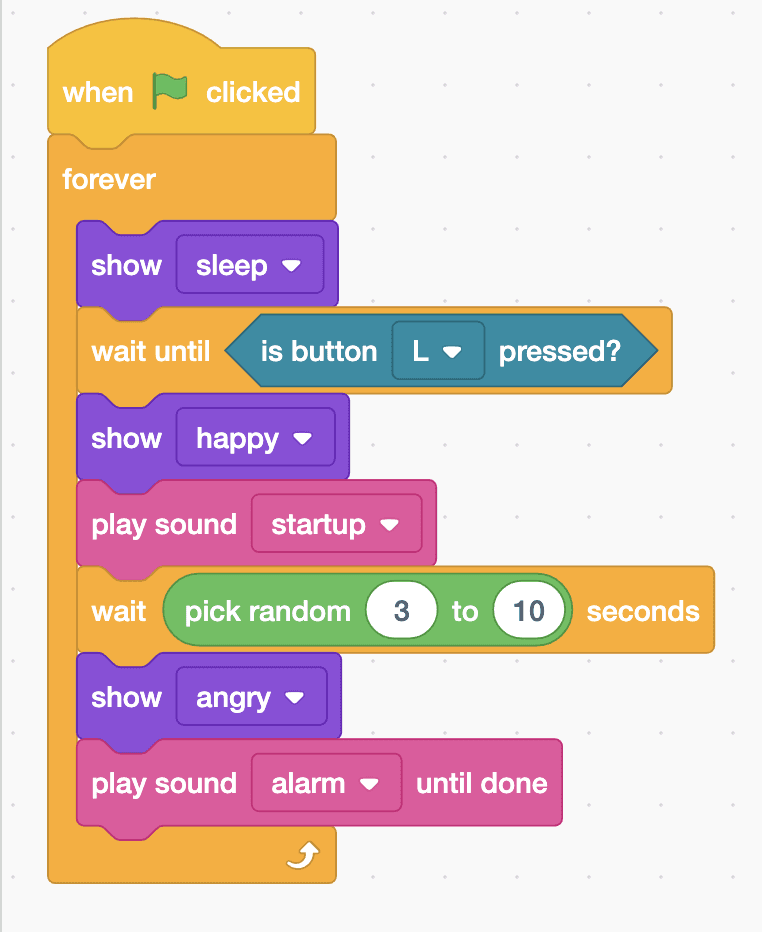
when green flag clicked
forever
  show [sleep v]
  wait until <is button [L v] pressed?>
  show [happy v]
  play sound [startup v]
  wait (pick random (3) to (10)) seconds
  show [angry v]
  play sound [alarm v] until done
endTest it
Click the green flag and MIEO shows a sleepy face. Press L: it smiles and plays its startup sound. Pass it round. After a few seconds, a different time every round, it turns angry and sounds the alarm. Then it goes back to sleep until someone presses L again.
If it doesn't work
- Nothing happens when you press L? Check that MIEO is still connected in Robolab's top bar and that you clicked the green flag.
- The alarm always comes at the same moment? Check that “pick random 3 to 10” sits inside the slot of the wait block, not under it.
- MIEO stops reacting partway through a game? It may have lost Bluetooth. Play closer to the computer, connect again and click the green flag.
Make it your own
- Easy: pick your own faces and sounds, such as surprise for the start of a round or lose for the end.
- Medium: make MIEO nervous. Split the wait into two random waits with “show surprise” between them, so its face changes partway through.
- Hard: keep count of the rounds with a variable, and show the number on the display before each new round starts.