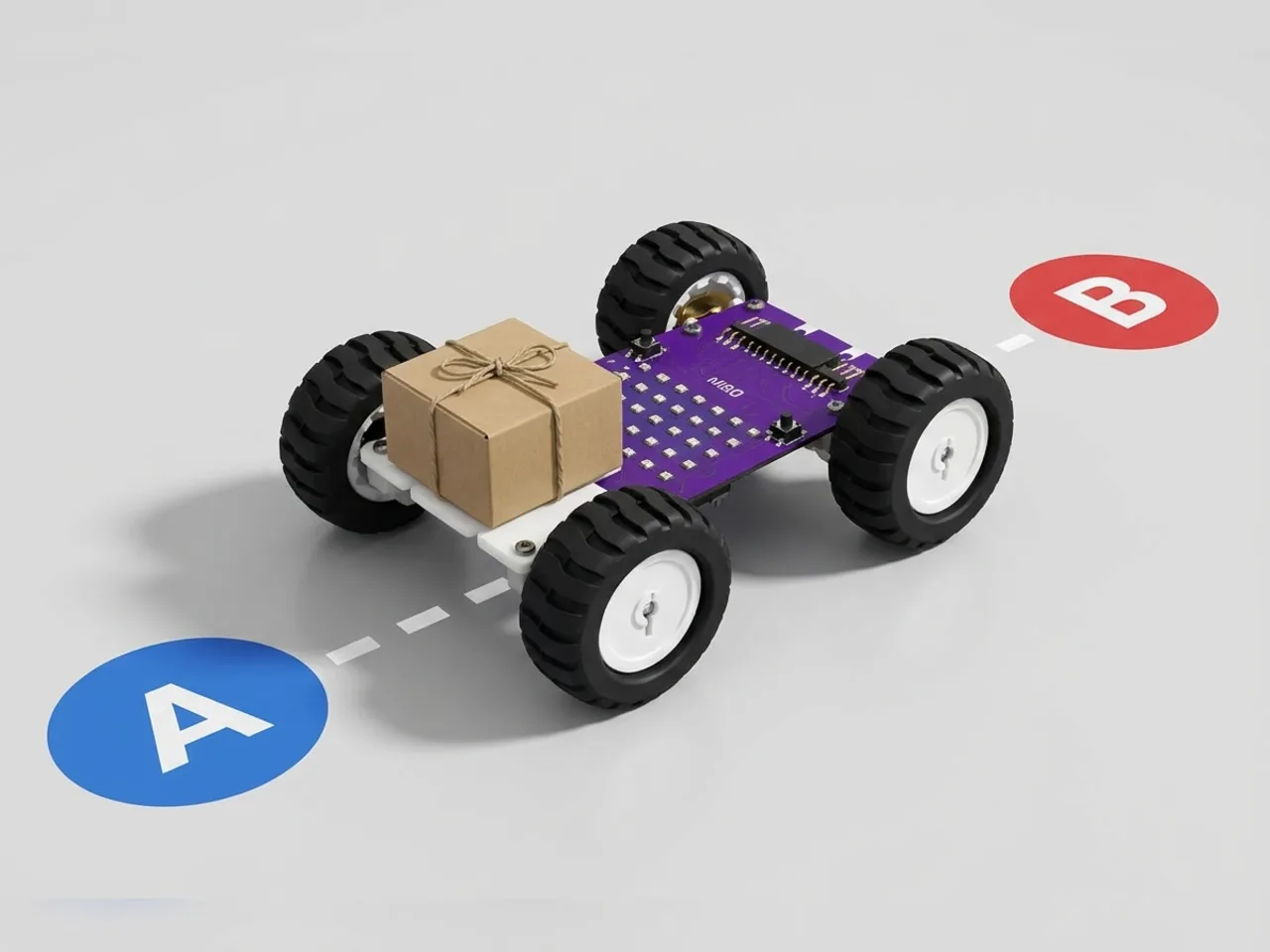
Delivery Bot
Carry a parcel along a timed route from A to B
What you'll build
Delivery robots carry food, post and parcels through hospitals, offices and pavements. In this project MIEO becomes one. Load a small parcel, press L, and MIEO drives along a route from point A to point B, turning a corner on the way. At B it plays a sound and waits for someone to take the parcel and press R. Then it turns round and drives the same route home. Every move is timed, so you'll tune the times until MIEO arrives in the right place.
What you'll learn
- Planning a route as a list of moves
- Timing moves: how long to drive and how long to turn
- Why a timed route drifts, and how to tune it
- Working out the way home by running the route backwards
You'll need
- Mieo board
- Two N20 motors and their wheels
- Battery
- 3D-printed mountings
- Caster wheel
- Screws and screwdriver
- Delivery Bot parts, from the Mieo Pro kit
- A small parcel, such as a matchbox
- Tape to mark points A and B
- A USB cable, or Bluetooth on your computer
- The Robolab app (free)
Stay safe
- Ask an adult to help with the small screws.
- Lift MIEO's wheels off the table before you upload a driving program, so it can't drive off the edge.
Build it
- Build the Delivery Bot from your Mieo Pro kit, with both N20 motors, their wheels, the caster wheel and the battery, as the Mieo Pro build guide shows.
- Make sure there's a flat space on top where a small parcel can sit without sliding off.
- On the floor, mark point A with tape. Then mark B about two steps ahead and one step to the right, so the route has a corner in it.
- Switch MIEO on and connect it to your computer with a USB cable or Bluetooth.
Code it
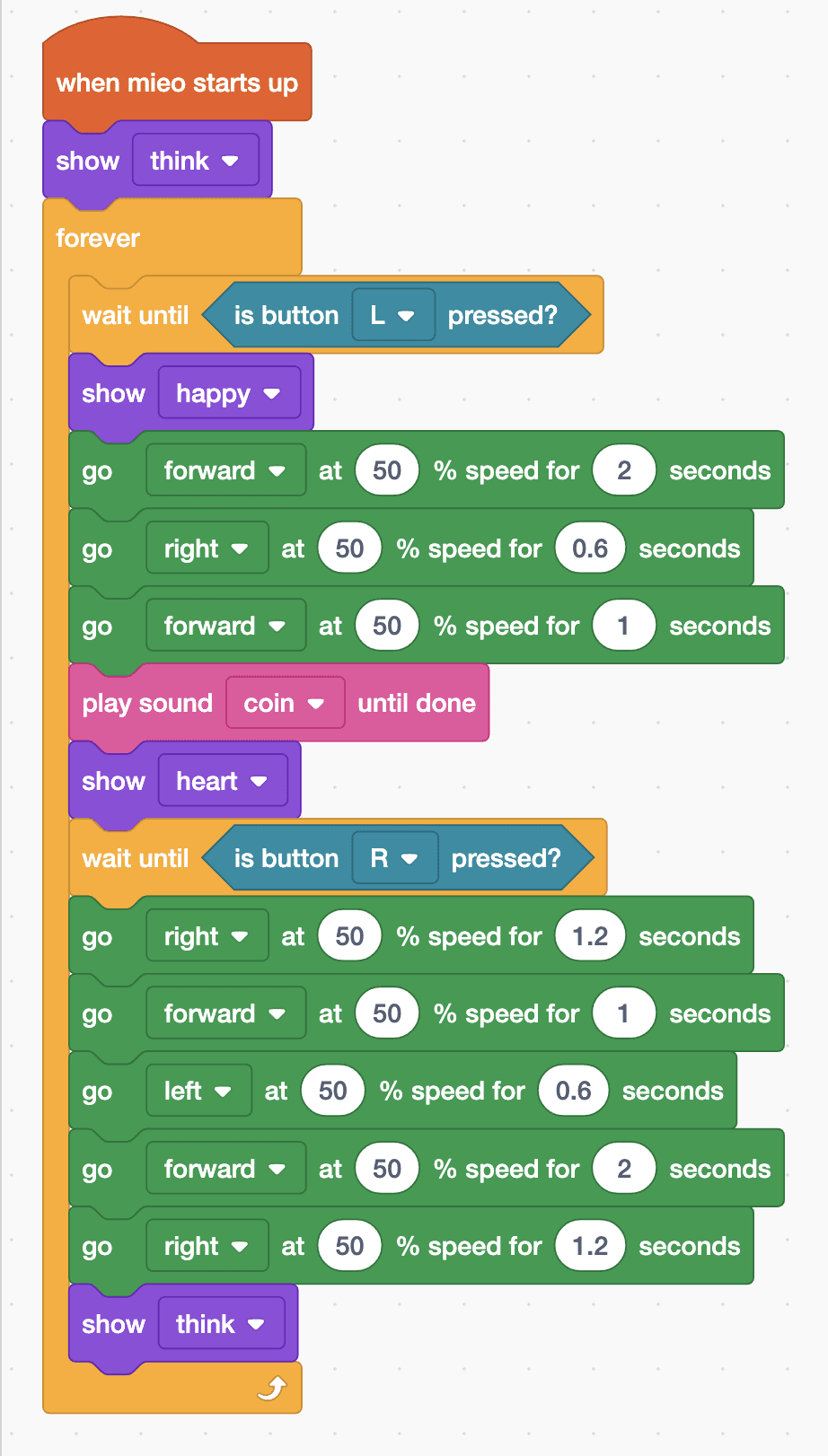
- Open Robolab, choose Mieo, connect and set the switch at the top right to Upload. Start with “when mieo starts up” and “show think”, then add a “forever” loop.
- The trip out: “wait until is button L pressed?”, “show happy”, then “go forward at 50 % speed for 2 seconds”, “go right at 50 % speed for 0.6 seconds” and “go forward at 50 % speed for 1 seconds”.
- The delivery: “play sound coin until done”, “show heart” and “wait until is button R pressed?”, so MIEO waits until someone takes the parcel.
- Turn round: “go right at 50 % speed for 1.2 seconds”, two quarter turns.
- The trip home is the route backwards: forward for 1 second, left for 0.6 seconds, forward for 2 seconds. Then turn round again with right for 1.2 seconds, and “show think”.
- Lift the wheels and upload. Put MIEO on A, facing B's direction, load the parcel and press L.
Upload mode: Robolab turns your blocks into MicroPython and sends them to MIEO over USB or Bluetooth. MIEO then runs the program by itself, even after you unplug it.
when mieo starts up
show [think v]
forever
  wait until <is button [L v] pressed?>
  show [happy v]
  go [forward v] at (50) % speed for (2) seconds
  go [right v] at (50) % speed for (0.6) seconds
  go [forward v] at (50) % speed for (1) seconds
  play sound [coin v] until done
  show [heart v]
  wait until <is button [R v] pressed?>
  go [right v] at (50) % speed for (1.2) seconds
  go [forward v] at (50) % speed for (1) seconds
  go [left v] at (50) % speed for (0.6) seconds
  go [forward v] at (50) % speed for (2) seconds
  go [right v] at (50) % speed for (1.2) seconds
  show [think v]
endSee the MicroPython
# generated by Robolab
import mieo

mieo.showemotion('think')
while True:
  while not mieo.button('L'):
     pass
  mieo.showemotion('happy')
  mieo.run('forward', 50)
  mieo.sleep(2 * 1000)
  mieo.stoprobot()
  mieo.run('right', 50)
  mieo.sleep(0.6 * 1000)
  mieo.stoprobot()
  mieo.run('forward', 50)
  mieo.sleep(1 * 1000)
  mieo.stoprobot()
  mieo.playsounduntildone('coin')
  mieo.showemotion('heart')
  while not mieo.button('R'):
     pass
  mieo.run('right', 50)
  mieo.sleep(1.2 * 1000)
  mieo.stoprobot()
  mieo.run('forward', 50)
  mieo.sleep(1 * 1000)
  mieo.stoprobot()
  mieo.run('left', 50)
  mieo.sleep(0.6 * 1000)
  mieo.stoprobot()
  mieo.run('forward', 50)
  mieo.sleep(2 * 1000)
  mieo.stoprobot()
  mieo.run('right', 50)
  mieo.sleep(1.2 * 1000)
  mieo.stoprobot()
  mieo.showemotion('think')
Test it
Press L: MIEO smiles, drives forward, turns right and drives on to B, where it plays a coin sound and shows a heart. Take the parcel and press R: MIEO spins round, drives back along the same route and turns to face the way it started, ready for the next delivery.
If it doesn't work
- MIEO turns too far or not far enough? Change the 0.6 in the right and left turns, and the 1.2 in the turn rounds, a little at a time until each corner is a quarter turn.
- It misses B even with good turns? Timed routes drift with the floor and the battery. Change the forward times to suit your floor, and charge the battery.
- The parcel falls off? Drive more slowly, such as 35 %, and give each move a little longer.
Make it your own
- Easy: move B somewhere else and change the times to match.
- Medium: add a second stop, C, with its own coin sound and heart, before coming home.
- Hard: make one block do each quarter turn by keeping the turn time in a variable, so you only tune one number.