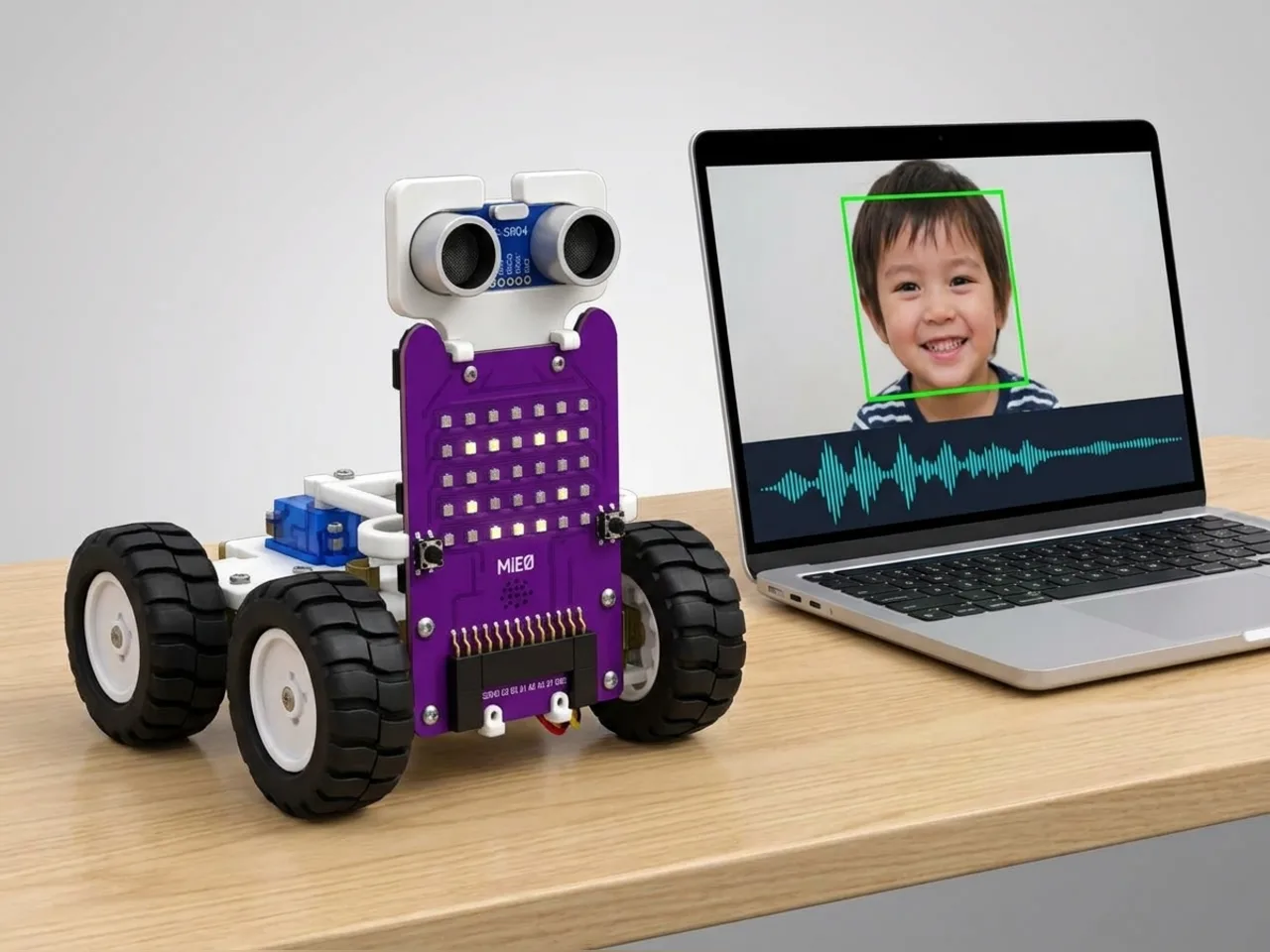
AI-Powered Interactive Robot
MIEO sees your face, hears your voice and chats back
What you'll build
This MIEO uses its eyes and its ears together. Face Sense watches the webcam: when someone sits down in front of it, MIEO wakes up and says hello, and when they leave, it asks where they went and goes to sleep. While someone is there, Speech Sense listens for four words: hello, dance, sing and bye. MIEO only answers when it can see who's talking, the way people look at each other in a conversation. Everything runs on your computer, with no internet.
What you'll learn
- Combining two AI senses, seeing and hearing, in one program
- Remembering whether someone is there in a variable that several scripts share
- Answering words only when someone is in view
- Mixing moves, sounds and faces into one personality
You'll need
- Mieo board
- Two N20 motors and their wheels
- Battery
- 3D-printed mountings
- Caster wheel
- Screws and screwdriver
- A webcam and a microphone; most laptops have both built in
- A computer with Bluetooth
- The Robolab app (free)
- A webcam (most laptops have one built in)
- A microphone (most laptops have one built in)
Stay safe
- Ask an adult to help with the small screws.
- Lift MIEO's wheels off the table before you upload a driving program, so it can't drive off the edge.
- The camera and microphone stay on your computer. Nothing MIEO sees or hears is sent anywhere.
Build it
- Build MIEO with both N20 motors, their wheels, the caster wheel and the battery, as in Switch Motor Start.
- Put MIEO on the table beside your computer, with room to spin, away from the edge.
- Switch MIEO on and connect it to your computer over Bluetooth. Sit facing the webcam in a quiet, well-lit room.
Code it
- Open Robolab, choose Mieo, connect and set the switch at the top right to Arena. Add Face Sense and Speech Sense, and make a variable called present.
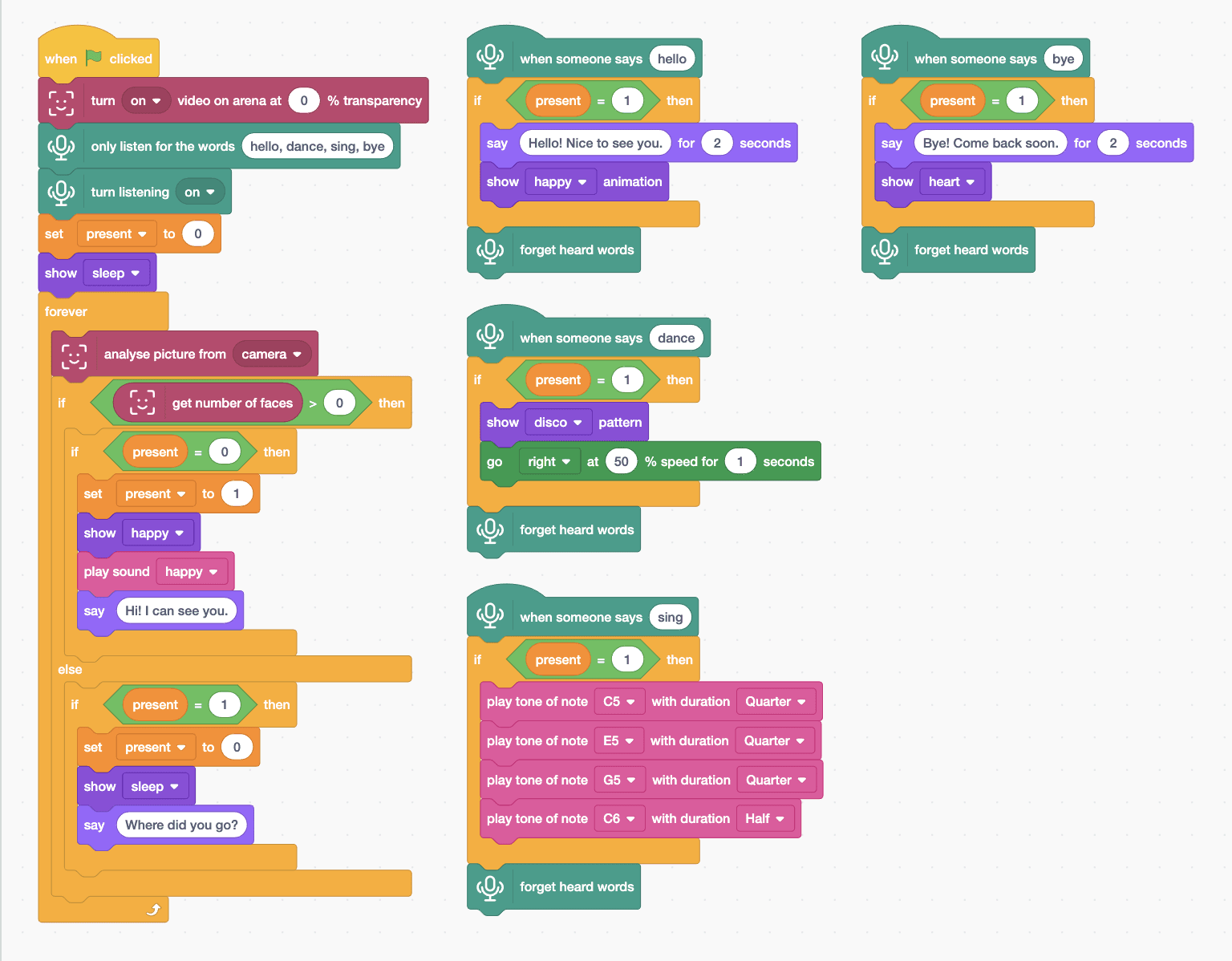
- Start with “when green flag clicked”, “turn on video on arena at 0 % transparency”, “only listen for the words hello, dance, sing, bye”, “turn listening on”, “set present to 0” and “show sleep”.
- Add a “forever” loop with “analyse picture from camera”, then “if … else” with “get number of faces > 0”.
- Someone arrives: in the top part, “if present = 0 then” with “set present to 1”, “show happy”, “play sound happy” and “say Hi! I can see you.”.
- Someone leaves: in the else part, “if present = 1 then” with “set present to 0”, “show sleep” and “say Where did you go?”.
- Add a script for each word: “when someone says hello”, “if present = 1 then” with a greeting, and “forget heard words”. Dance shows the disco pattern and spins; sing plays four notes; bye says goodbye with a heart.
- Click the green flag, allow the camera and microphone, and sit down in front of MIEO.
Arena mode: the program runs on your computer and talks to MIEO live over USB or Bluetooth, so keep MIEO switched on and connected.
when green flag clicked
turn [on v] video on arena at (0) % transparency
only listen for the words (hello, dance, sing, bye)
turn listening [on v]
set [present v] to (0)
show [sleep v]
forever
  analyse picture from [camera v]
  if <(get number of faces) > (0)> then
    if <(present) = (0)> then
      set [present v] to (1)
      show [happy v]
      play sound [happy v]
      say (Hi! I can see you.)
    end
  else
    if <(present) = (1)> then
      set [present v] to (0)
      show [sleep v]
      say (Where did you go?)
    end
  end
end

when someone says (hello)
if <(present) = (1)> then
  say (Hello! Nice to see you.) for (2) seconds
  show [happy v] animation
end
forget heard words

when someone says (dance)
if <(present) = (1)> then
  show [disco v] pattern
  go [right v] at (50) % speed for (1) seconds
end
forget heard words

when someone says (sing)
if <(present) = (1)> then
  play tone of note [C5 v] with duration [Quarter v]
  play tone of note [E5 v] with duration [Quarter v]
  play tone of note [G5 v] with duration [Quarter v]
  play tone of note [C6 v] with duration [Half v]
end
forget heard words

when someone says (bye)
if <(present) = (1)> then
  say (Bye! Come back soon.) for (2) seconds
  show [heart v]
end
forget heard wordsTest it
Click the green flag and MIEO sleeps. Sit down in front of the webcam: MIEO wakes up, plays its happy sound and the sprite says “Hi! I can see you.” Say “hello” and it greets you; “dance” starts disco lights and a spin; “sing” plays four rising notes; “bye” shows a heart. Walk away and MIEO asks where you went and goes back to sleep. Words said while nobody is in view are ignored.
If it doesn't work
- MIEO doesn't wake up? Sit facing the camera in good light, close enough for your face to be clear.
- It ignores your words? It only answers while it can see you, so stay in the picture, and speak clearly.
- It keeps waking and sleeping? Face Sense is losing your face. Keep still, facing the camera, with light in front of you.
Make it your own
- Easy: change MIEO's answers and the notes of its song.
- Medium: add a fifth word, such as “joke”, with an answer of your own.
- Hard: count how long each visitor stays, using the timer, and tell them when they say bye.
What to build next
AI
IoT-Connected Robotics System
Send MIEO's sensor readings to the cloud and read them back
AI
AI-Based Smart Robotics System
A capstone robot that sees, hears and decides for itself
Competition
Sumo Push Bot
Push your opponent out of the ring without leaving it