Gripper Pick-and-Place Robot
Pick up a block, carry it and put it down in one sequence
What you'll build
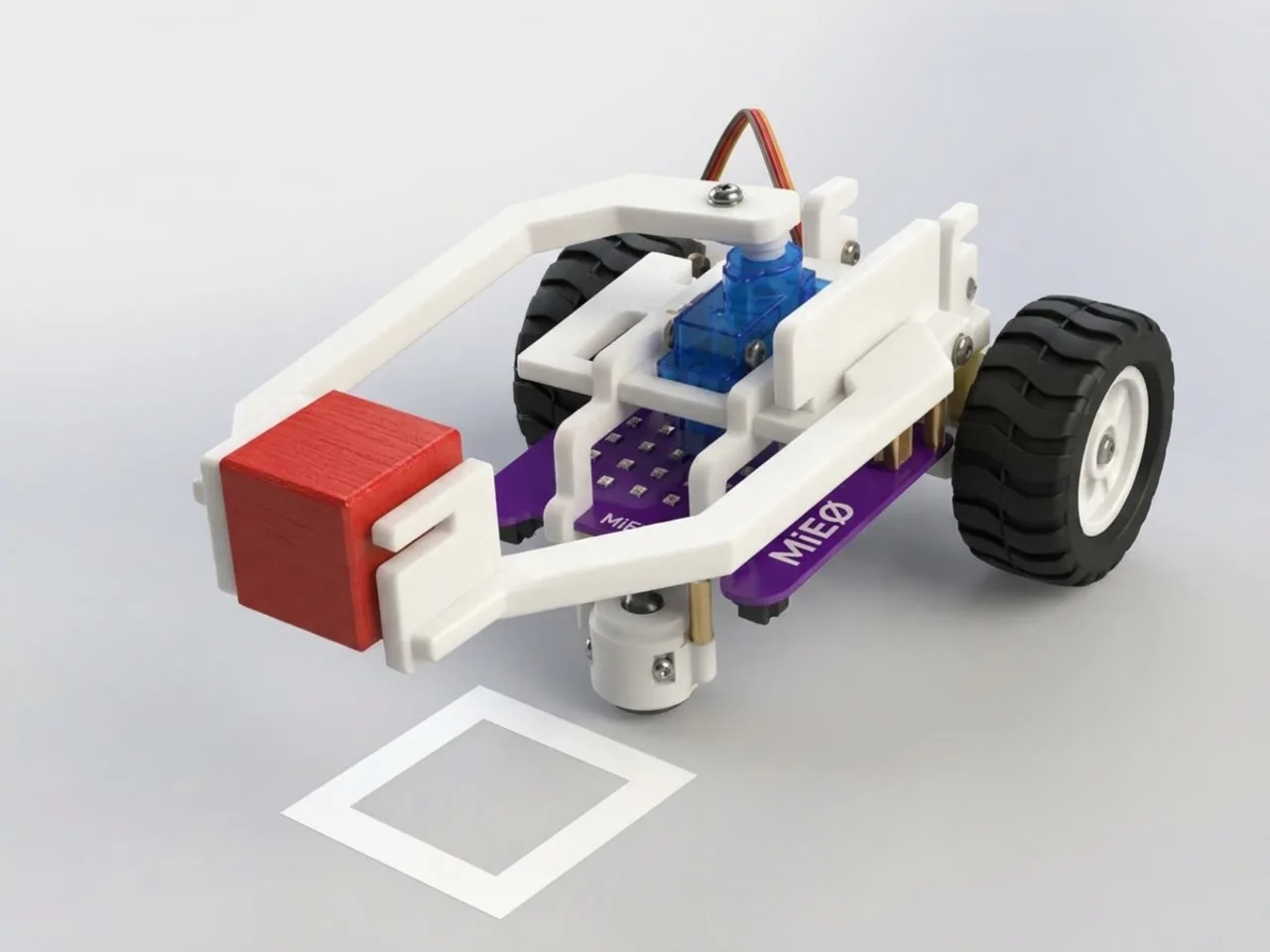
A pick-and-place robot does one job again and again: grab something, move it, let it go. With the Mieo Pro kit, MIEO gets a gripper arm worked by two servo motors. One opens and closes the gripper, and the other lifts the arm up and down. In this project you break that job into small steps, and MIEO runs the whole sequence every time you press its L button.
What you'll learn
- How a servo motor turns to an exact angle and holds it there
- How to break a big task into small steps in the right order
- Why short waits give a servo time to finish moving
- How “wait until” pauses a program until a button is pressed
You'll need
- Mieo board
- Two N20 motors and their wheels
- Battery
- 3D-printed mountings
- Caster wheel
- Screws and screwdriver
- Gripper arm parts, from the Mieo Pro kit
- Two servo motors, from the MIEO kit
- The Robolab app (free)
Stay safe
- Ask an adult to help with the small screws.
- Lift MIEO's wheels off the table before you upload a driving program, so it can't drive off the edge.
- Plug extra parts only into the connector this page names. Wiring a part to the wrong connector can damage it for good.
Build it
- Build the MIEO base with both motors, their wheels, the caster wheel and the battery, as in the Line Follower Robot.
- Put the gripper and the arm together from the Mieo Pro parts.
- Plug the gripper servo into connector S1 and the arm servo into connector S2.
- Before you tighten the arm, upload this project once. The servos move to their start angles, with the gripper open and the arm up. Then fit the parts so they match that position.
- Fix the arm to the front of MIEO so the gripper can reach the table.
Code it
- Choose Mieo as your device, connect to it and set the switch at the top right to Upload.
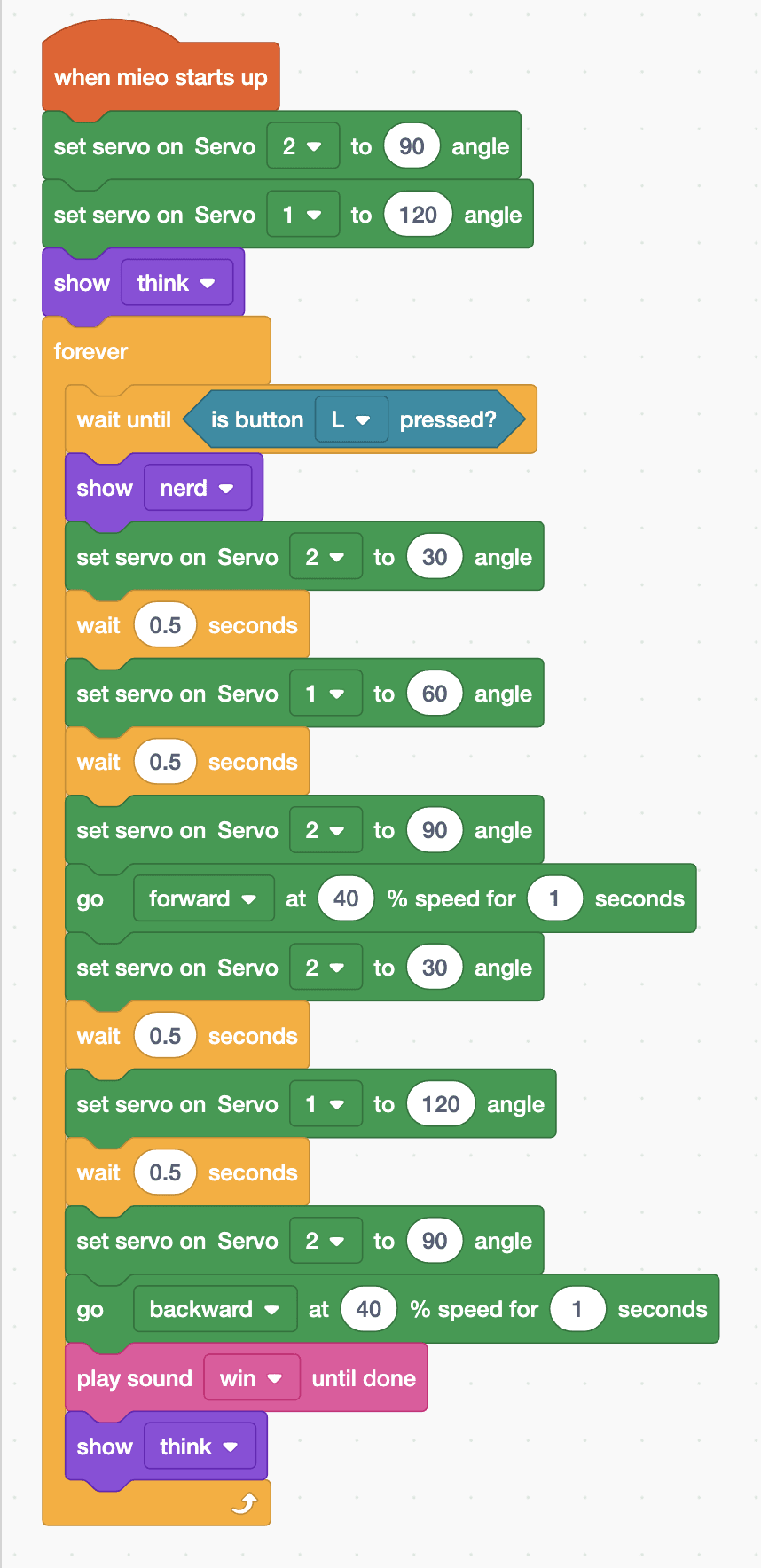
- Start with “when mieo starts up”. Add “set servo on Servo 2 to 90 angle” to lift the arm and “set servo on Servo 1 to 120 angle” to open the gripper, then “show think”.
- Add a “forever” loop. Its first block is “wait until is button L pressed?”, so MIEO waits for you before every pick.
- Pick up: arm down (Servo 2 to 30), wait 0.5 seconds, close the gripper (Servo 1 to 60), wait 0.5 seconds, arm up (Servo 2 to 90).
- Carry: add “go forward at 40 % speed for 1 seconds”.
- Put down: arm down, wait, open the gripper, wait, arm up. Then “go backward at 40 % speed for 1 seconds”, “play sound win until done” and “show think”, ready for the next press.
Upload mode: Robolab turns your blocks into MicroPython and sends them to MIEO over USB or Bluetooth. MIEO then runs the program by itself, even after you unplug it.
when mieo starts up
set servo on Servo [2 v] to (90) angle
set servo on Servo [1 v] to (120) angle
show [think v]
forever
  wait until <is button [L v] pressed?>
  show [nerd v]
  set servo on Servo [2 v] to (30) angle
  wait (0.5) seconds
  set servo on Servo [1 v] to (60) angle
  wait (0.5) seconds
  set servo on Servo [2 v] to (90) angle
  go [forward v] at (40) % speed for (1) seconds
  set servo on Servo [2 v] to (30) angle
  wait (0.5) seconds
  set servo on Servo [1 v] to (120) angle
  wait (0.5) seconds
  set servo on Servo [2 v] to (90) angle
  go [backward v] at (40) % speed for (1) seconds
  play sound [win v] until done
  show [think v]
endSee the MicroPython
# generated by Robolab
import mieo

mieo.setservo('S2', 90)
mieo.setservo('S1', 120)
mieo.showemotion('think')
while True:
  while not mieo.button('L'):
     pass
  mieo.showemotion('nerd')
  mieo.setservo('S2', 30)
  mieo.sleep(0.5 * 1000)
  mieo.setservo('S1', 60)
  mieo.sleep(0.5 * 1000)
  mieo.setservo('S2', 90)
  mieo.run('forward', 40)
  mieo.sleep(1 * 1000)
  mieo.stoprobot()
  mieo.setservo('S2', 30)
  mieo.sleep(0.5 * 1000)
  mieo.setservo('S1', 120)
  mieo.sleep(0.5 * 1000)
  mieo.setservo('S2', 90)
  mieo.run('backward', 40)
  mieo.sleep(1 * 1000)
  mieo.stoprobot()
  mieo.playsounduntildone('win')
  mieo.showemotion('think')
Test it
After the upload, the arm lifts, the gripper opens and MIEO shows its thinking face. Put a small block in front of the gripper and press L. MIEO lowers the arm, grips the block, lifts it, drives forward for one second, puts the block down, backs up and plays its win sound. Press L again to do it all over.
If it doesn't work
- The gripper doesn't hold the block, or squeezes too hard? Change 60 a little at a time. A smaller angle closes the gripper further.
- The arm hits the table or doesn't reach the block? Change the down angle, 30, by 5 at a time.
- A servo jitters or doesn't move at all? Check that it is plugged into the right connector, S1 or S2, and the right way round.
Make it your own
- Easy: change the faces and the final sound so MIEO celebrates in its own way.
- Medium: make MIEO carry the block twice as far, then drive all the way back to where it started.
- Hard: use button R for a second job, like lifting the block higher and stacking it on top of another one.
What to build next
Robot arms
Warehouse Picker Robot
Follow a line to a shelf, pick up a box and bring it back
Robot arms
Automated Pick-and-Place System
Grab an object automatically when the sensor sees it
Robot arms
Remote-Controlled Robotic Arm
Work an arm and gripper with two servos from your keyboard